
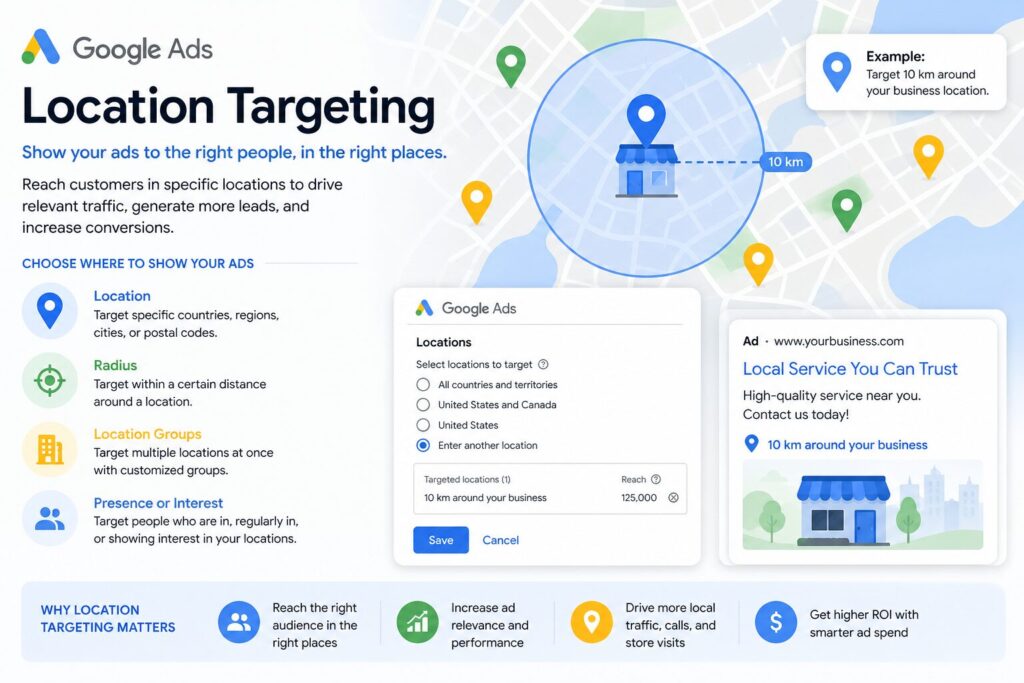
For SMBs, location targeting can literally be the difference between success and failure. Target the wrong area, and you’ve blown your PPC budget and created inaccurate performance data. Worst of all, you’ve failed to attract any prospective clients.
You may think your ads are targeting specific neighbourhoods in Sydney, Melbourne, or Brisbane. Instead, they’re appearing in search results for locations far beyond your service area. Understanding exactly where businesses go wrong with location targeting is worth the effort.
How Does Google Ad Location Targeting Actually Work?
In theory, the concept is easy. You pay Google to provide you with SERP visibility for your service area. When setting up a campaign, you select the town, postcodes, or radius within which your business services. Then, users who search for your goods or services by location will see your business in their search results.
‘Your service area’ means different things to different businesses. A dentist might service a smaller radius than a boutique hotel that draws guests from across the country. Getting this definition right before you set up a single campaign is the foundation everything else builds on.
Google Ads targets users in two ways.
- Where they search for (their location of interest). Someone who searches for ‘dentist Brisbane’ will see your business in their search results if you’re a dentist and Brisbane-based.
- Where they are (their physical location). Your business will appear in the SERPs if they’re currently in Brisbane and they search ‘dentist near me’.
In both scenarios, you’ll be competing against all other Brisbane-based dentists who have paid for Google Ads. Google orders results based on relevance, competitive bidding, and strategic targeting.
Overall, location targeting in Google Ads should be easy to carry out. But it causes a lot of issues for a lot of businesses, as evidenced by the stats. Wrong geographic targeting (among other issues) wastes 76% of Google Ads budgets.
The 3 Most Common (and Costly) Google Ad Location Targeting Mistakes

Most Ad campaign issues stem from preventable, easily-fixable mistakes.
Not Changing Default Settings
You need to understand the difference between ‘Presence Targeting’ and ‘Interest Targeting’. When you leave your Google Ads on their default settings, they target both.
‘Presence Targeting’ targets users who are in your area. As in, physically located or, at least, regularly in your area. Google analyses Wi-Fi, GPS, and IP addresses to determine the location of the user.
‘Interest Targeting’, on the other hand, targets users who have shown interest in your business services. However, these users are not physically present in your area, nor do they regularly visit. They can see your ads when they search for the location and relevant keywords. If they’re located in Sydney, and they search ‘hotels in Melbourne’, they will see relevant location-based ads.
By default, Google Ads are set up as ‘Presence or interest’, which activates both Presence and Interest Targeting. Businesses that regularly attract national or international customers (travel, tourism, or real estate, for example) benefit from keeping both settings active. However, it can negatively impact businesses that only serve local customers, such as dentists, plumbers, or bakers.
Depending on your business, you should either leave this default setting on or change it to ‘Presence only’.
Relying on Google Ads Preview
Google Ads Preview allows you to review how your ads appear on the SERPs. It creates a simulation of how your ad might appear in the search results pages for a specific location.
Its primary function is to troubleshoot issues that your ad may be experiencing. Specifically, it can reveal issues related to budget, keywords, and location.
However, what Preview shows you does not align with what prospective customers see on live SERPs. It doesn’t generate a full search results page. Therefore, you don’t get to see competitor ads or get any real sense of the competitive environment.
Instead of reviewing the SERPs on Preview, you can use VPN software to analyse search results for a specific location. Some VPNs allow you to connect to servers in specific cities, rather than just countries.
For example, you could connect to a server in Sydney, then search for your keyword. The results will reflect exactly what a Sydney-based user sees.
Misreading Data
Data can be misread when analysing your Google Ads. Broad targeting settings can result in inaccurate numbers.
For example, a high click level in ‘Sydney’ could also include areas you don’t service, such as the Central Coast. At the same time, low conversion levels may also be a result of this. If you target an area too broadly, your ad will reach people who aren’t a good fit.
Many advertisers also overlook mobile location drift. Users using VPNs themselves often receive ads for areas they’re not physically located in. As do those who regularly commute or travel through your service area.
Such inaccuracies often result in businesses increasing or cutting spending, not realising their data is skewed.
Understand Location Targeting Before You Scale
While Australia may be the fourth biggest user of Google Ads worldwide, many businesses still struggle to use it effectively. Many work off assumptions, resulting in them losing thousands of dollars. Leaving default settings unchanged, relying on Preview, and misreading data can waste entire marketing campaigns. Before increasing or decreasing your advertising budget, consider the accuracy of the data you’re reviewing.