

Conflicting canonical tags and inaccurate lastmod dates send Google’s crawlers contradictory instructions about which pages matter and which content is current. The result: wasted crawl budget, suppressed rankings, and pages stuck in Google’s lowest index tiers where they rarely surface for meaningful queries.
TL;DR: When canonical tags point to redirecting URLs, lastmod dates don’t reflect real changes, or status codes return soft errors, crawlers lose trust in your site’s signals. Fix these six rules in order, and your crawl efficiency, indexation rate, and duplicate content handling improve together.
Google’s updated crawling documentation from March 2026 confirmed that Googlebot and AI training crawlers now share infrastructure across 30+ years of indexed data. A single misconfigured canonical tag affects your traditional search rankings and erodes AI search indexation confidence simultaneously. Australian businesses running e-commerce stores with faceted navigation, multi-location service sites, or WordPress installs with parameter-heavy URLs are particularly exposed because these setups generate duplicate URLs by default.
The six rules below address canonical tags freshness signals, crawl efficiency status codes, and the lastmod dates Google crawlers rely on. Each rule is independent, but they compound. Fix one, and the others start working harder.
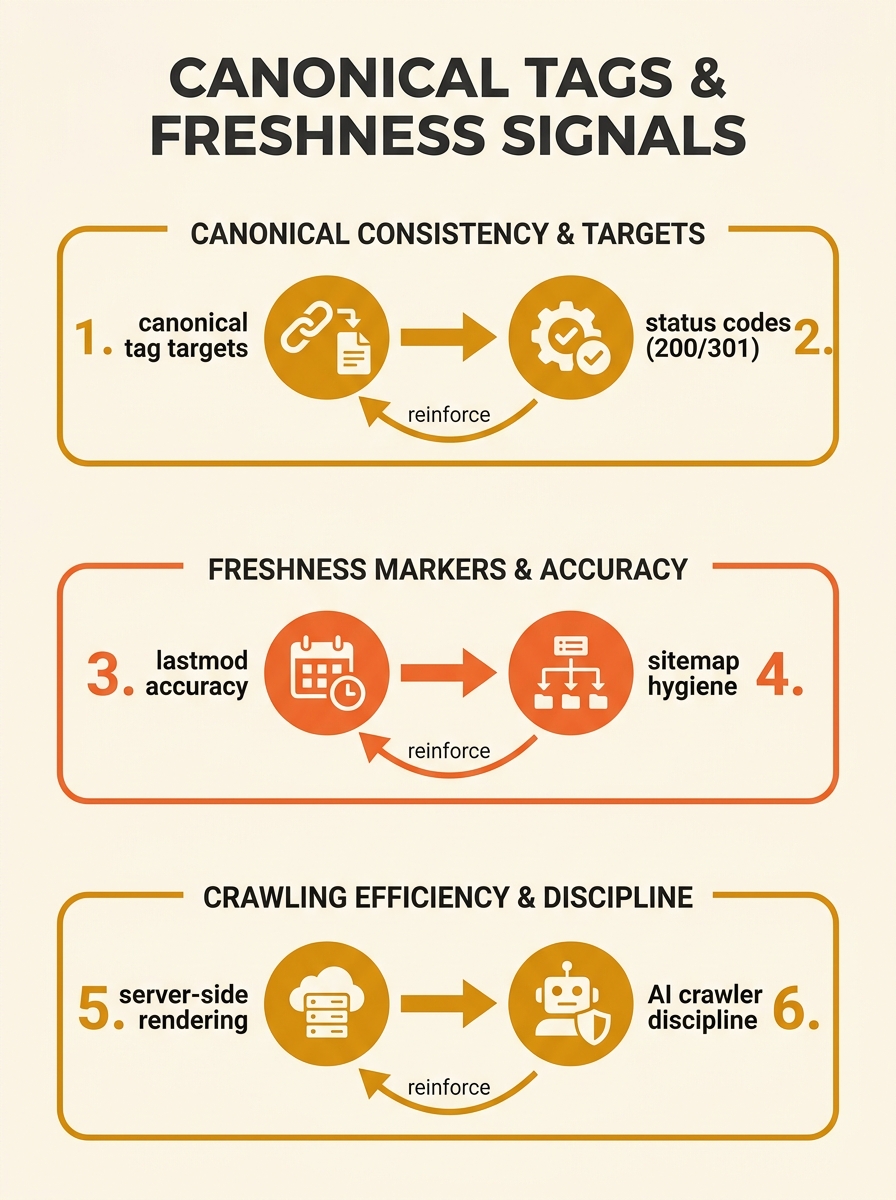
Never point a canonical tag to a URL that redirects
If Page A’s canonical tag references Page B, and Page B 301-redirects to Page C, Google receives two conflicting instructions. The canonical says “Page B is authoritative.” The redirect says “Page B no longer exists, go to Page C.” Crawlers faced with this conflict will often ignore the canonical signal entirely, leaving Google to make its own decision about which version to index.
Straight North’s canonical tag analysis states directly: “Canonical tags remain the most effective tool for managing parameter-driven duplicates”, but they only work when the target URL returns a clean 200 status code. The fix is mechanical: audit every canonical URL on your site with a crawler like Screaming Frog, filter for any target returning a 301, 302, or 404 status, and update the canonical to the final destination URL. On a 500-page Australian e-commerce site with 3 to 4 URL parameters per product page, this single check often uncovers 40 to 60 broken canonical references.
If you’ve dealt with canonical tag problems creating hidden duplicate content before, you’ll recognise this as the most common root cause.
Render canonical tags server-side, not through JavaScript
Each page should contain exactly one canonical tag in the HTML head section. Multiple canonical tags cause crawlers to ignore the signal entirely, treating it as unreliable. But the more common problem for technical SEO duplicate content on Australian sites in 2026 is canonical tags that exist in your JavaScript bundle but never appear in the server-rendered HTML that Googlebot actually parses on first pass.
Google’s rendering queue processes JavaScript separately from its initial HTML crawl. A canonical tag injected by client-side React, Vue, or Angular code may not be picked up during the crawl phase at all. The March 2026 crawling documentation emphasises that crawl budget is “limited by server capacity and Google’s demand signals,” and pages requiring JavaScript rendering to discover basic directives consume more of that budget than pages with clean server-rendered HTML.
For Australian businesses running headless CMS setups or single-page applications, server-side rendering (SSR) or static pre-rendering of canonical tags is the minimum requirement. Your page’s HTML source, before any JavaScript executes, must contain the canonical tag. Test this by viewing your page source (not the inspector, which shows the rendered DOM) and confirming the tag appears.
Match lastmod dates to actual content changes
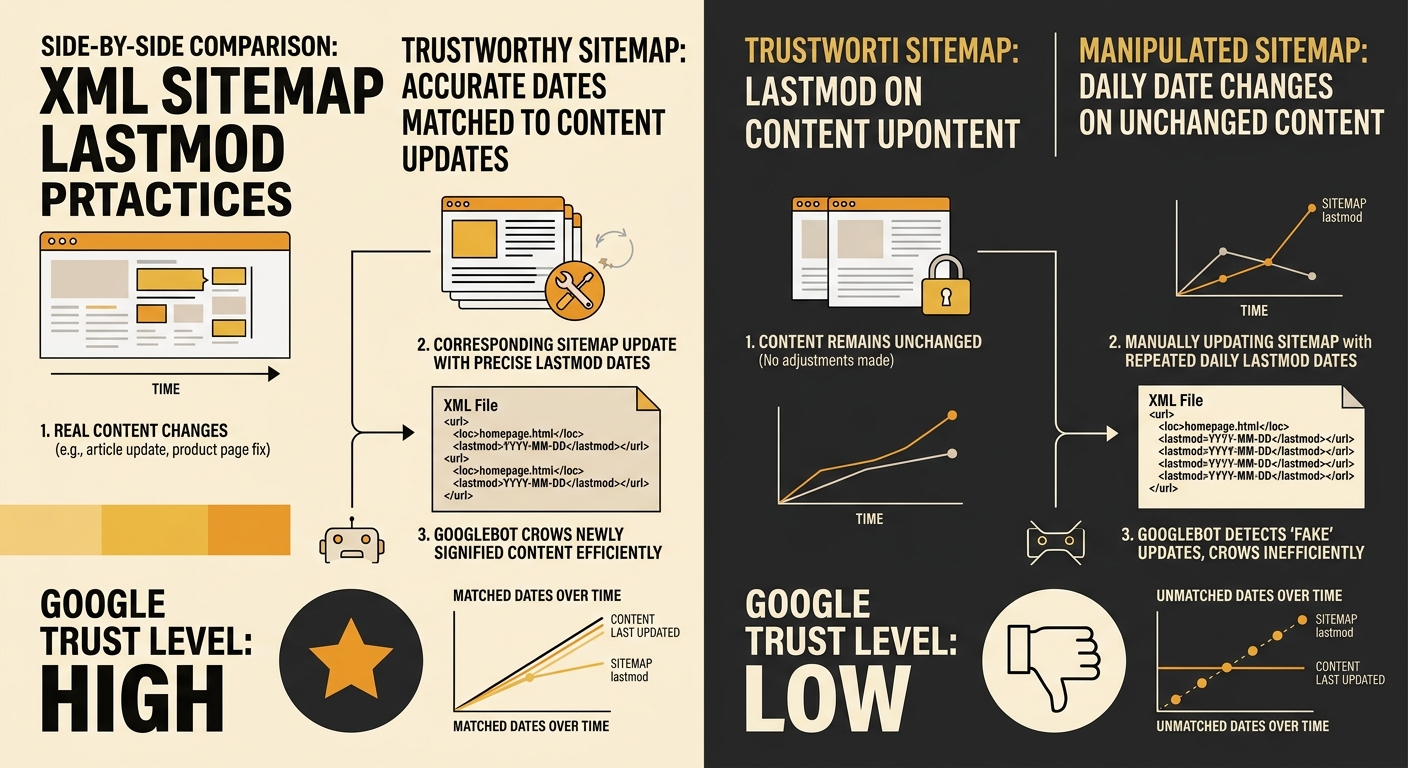
The lastmod element in XML sitemaps was designed to provide a precise signal of content freshness using ISO 8601 date format. In practice, a significant number of sites abuse it. A thread in the r/SEO community documented competitors who update their sitemap lastmod dates to the current date daily, regardless of whether content actually changed, attempting to game freshness signals.
This tactic backfires. Google cross-references lastmod dates against actual content changes detected during crawling. When a sitemap claims daily updates but Googlebot finds identical content on each visit, the crawler learns to distrust that site’s lastmod data. The consequence: when you do publish a genuine update, Google’s crawl scheduler may not prioritise revisiting the page because your freshness signals have lost credibility.
The rule for lastmod dates Google crawlers trust is straightforward. Update the date only when you’ve made a substantive content change. Adding a new section with 150+ words of original analysis, updating statistics with current data, or restructuring the page’s information hierarchy all qualify. Changing a publish date in your CMS template or swapping one sentence does not.
Warning: If your CMS automatically updates lastmod every time you save a draft or fix a typo, override this behaviour. WordPress, Shopify, and most Australian-hosted platforms update sitemap dates on every save by default, including minor edits to metadata or layout. Configure your sitemap plugin to trigger lastmod changes only on content-body updates.
Return clean status codes on every URL you want indexed
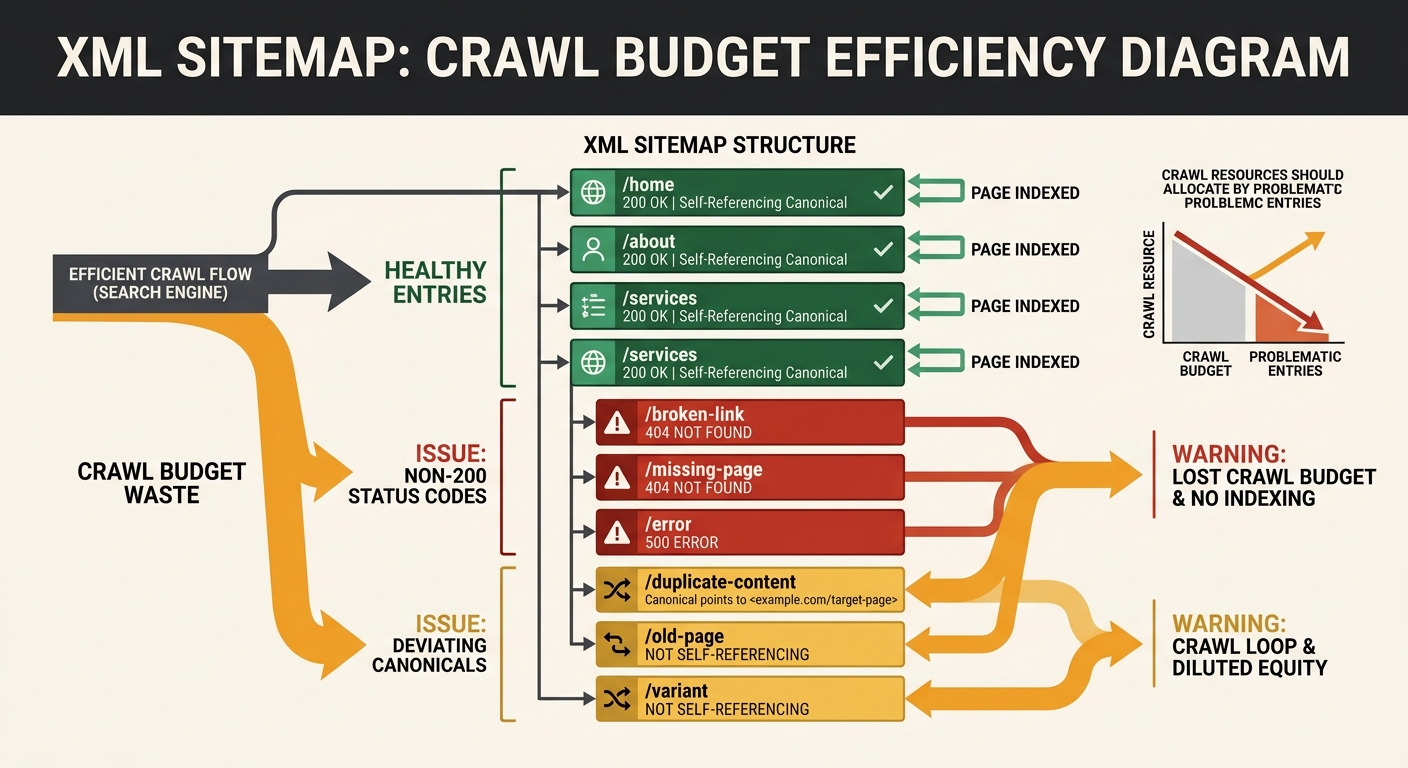
Crawl efficiency status codes determine whether Google spends its crawl budget on your valuable pages or wastes it processing errors. The 2026 HTTP Status Codes SEO Reference Guide from Digital Applied states clearly that “every page you want indexed must return” a 200 OK status code. Every other status code is either a redirect instruction, an error signal, or an ambiguity that costs you crawl budget.
The most damaging pattern for Australian sites is the soft 404: a page that displays “no results found” or a generic error message to users but returns a 200 OK status code to crawlers. Googlebot indexes these pages because the HTTP response says everything is fine. The result is thin, valueless pages competing with your real content in Google’s index. OnCrawl’s analysis of HTTP status code impact specifically warns against this pattern, noting the difference between a true 404 (page doesn’t exist) and a 410 (page existed but has been permanently removed, so stop recrawling).
A site returning 200 OK on error pages is telling Google “this content is real and ready to index” when the opposite is true.
Run a crawl of your full site at least quarterly. Filter for pages returning 200 status codes that contain fewer than 100 words of body content, or that match known error-page patterns. Convert these to proper 404 or 410 responses. On sites with 1,000+ URLs, this cleanup alone can recover 15 to 25% of wasted crawl budget. Understanding how site architecture decisions affect Google’s AI search indexing gives you additional context on why clean status codes matter beyond traditional search.
Audit your sitemap for non-canonical URLs
Your XML sitemap should function as a curated list of every URL you want Google to index. V9 Digital’s sitemap guide reinforces that “XML sitemaps are for crawlers,” and that accurate timestamps in those sitemaps help AI systems interpret current, geolocation-relevant information. When your sitemap contains URLs that canonicalise to other pages, or URLs returning 301 redirects, you’re sending Google a contradictory message: “please crawl this page” and “this page isn’t the authoritative version” at the same time.
PanPan Digital’s canonical tag guide explains the consequence: canonical tags “protect against cannibalisation of your own content and ensure that only the most relevant version ends up in the Google index,” but only when sitemaps and canonicals agree. A sitemap listing 2,000 URLs where 400 of them canonicalise elsewhere wastes 20% of your crawl budget on pages Google will ultimately ignore.
The audit process: export your sitemap URLs, crawl them, and flag any URL where the canonical tag points to a different URL or where the HTTP status code is anything other than 200. Remove flagged URLs from your sitemap. For Australian multi-location businesses running 10 to 50 location pages with parameter variations, this single cleanup often removes 30 to 40% of sitemap bloat. The same logic applies when you’re checking for robots.txt and meta robots conflicts that cancel each other out.
Treat AI crawlers with the same signal discipline as Googlebot
Google confirmed in its March 2026 documentation that AI training and search indexing “often share the same crawler (Googlebot).” Your canonical tags, lastmod dates, and status codes affect traditional search rankings and directly influence whether AI systems like Google’s AI Overviews, ChatGPT’s browsing feature, and Perplexity’s indexer trust your content enough to cite it. Tools like Rankability’s AI Search Indexability Checker now test crawl accessibility across Googlebot, Bingbot, and AI-specific crawlers simultaneously.
AI search indexation confidence depends on the same technical foundations as traditional SEO: clean status codes, accurate freshness signals, and unambiguous canonical references. Pages sitting in Google’s lower index tiers (what internal documentation has referred to as “Landfills”) are rarely surfaced for AI Overview citations regardless of content quality. If your technical setup pushes pages into those tiers through duplicate content signals or broken canonicals, no amount of content optimisation will recover AI visibility.
For Australian businesses tracking how brand visibility works across ChatGPT and Perplexity, the technical layer is the prerequisite. AI systems cite pages they can crawl cleanly, parse unambiguously, and trust for freshness. Every rule in this article applies equally to both traditional and AI search surfaces.
When These Rules Contradict Each Other
Occasionally these rules create tension. You might have a page that should canonicalise to another URL but also needs to appear in your sitemap for a specific crawl-priority reason. Or a CMS that ties lastmod updates to template changes you can’t control without custom development. The resolution is always the same: canonical tags and status codes take priority over sitemap inclusion and lastmod accuracy. A page with a correct canonical returning a clean 200 is recoverable even if its lastmod date is slightly off. A page with a broken canonical or a soft-404 status code is invisible to crawlers regardless of how perfect its sitemap entry looks.
Google pushes thousands of ranking updates per year, and core updates can shift which signals carry more weight. But the foundational technical signals covered here have remained stable across every algorithm change since mobile-first indexing rolled out in October 2023. Get these six rules right, and your site gives crawlers clear, consistent instructions instead of contradictory noise. That consistency is what separates sites that recover quickly from core updates from those that spiral into months of lost visibility.