
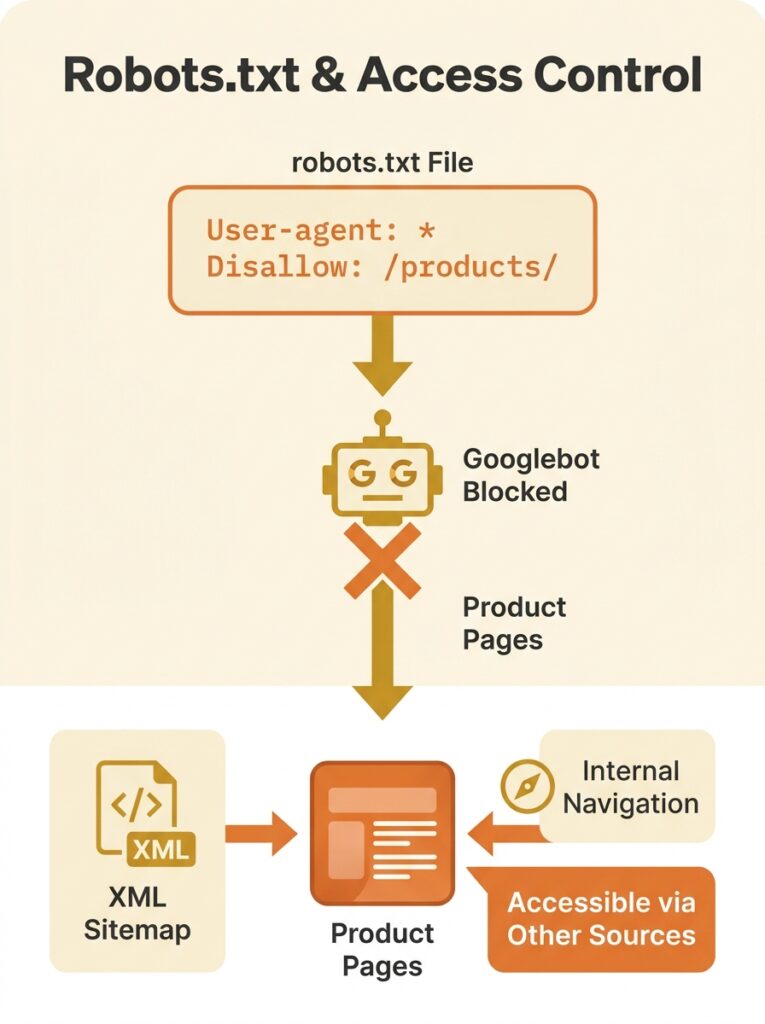
Wellows flagged a pattern in their 2026 audit of common technical SEO issues that should make every eCommerce store owner uncomfortable: blocking a directory like /products/ or /collections/ in robots.txt will prevent every page inside it from being crawled, regardless of how many internal links point to those pages, regardless of whether they sit in your XML sitemap, and regardless of how carefully you’ve written your canonical tags. The directive is absolute. Googlebot reads that line, turns around, and never looks at the content behind it. For an online store where product pages are the entire revenue engine, this kind of technical SEO misconfiguration is catastrophic. And it happens far more often than you’d expect, because robots.txt conflicts don’t trigger loud alarms — they produce quiet disappearances.
This article walks through one of the most common and damaging patterns we encounter on Australian eCommerce sites: a robots.txt disallow rule that cascades into canonical tag conflicts, wasted Google crawl budget, and months of invisible ranking loss. Each phase of the breakdown has its own logic, which is precisely why it’s so hard to spot when you’re inside it.
How a Single Robots.txt Line Buries a Product Catalogue
The origin story is almost always a migration or a staging environment. A developer adds a broad disallow rule to robots.txt during a rebuild — blocking /products/ or /shop/ to keep half-finished pages out of Google’s index. The site launches. The disallow rule stays. Nobody reviews robots.txt post-launch because, frankly, it’s a plain-text file that most teams treat as set-and-forget.
Google’s own documentation is explicit about what happens next: robots.txt is designed to manage crawl load, not to control indexing. It tells Googlebot “don’t look at this page at all.” But here’s where things get strange. If Google discovers those product URLs through other signals — backlinks, sitemaps, internal links — it can still index the URLs. It indexes the reference to the page without ever seeing the page content.
The result is a ghost listing: a URL in Google’s index with no title tag, no meta description, and no content to evaluate. For an eCommerce store with thousands of product SKUs, this means thousands of ghost entries occupying space in Google’s crawl queue while contributing nothing to rankings.
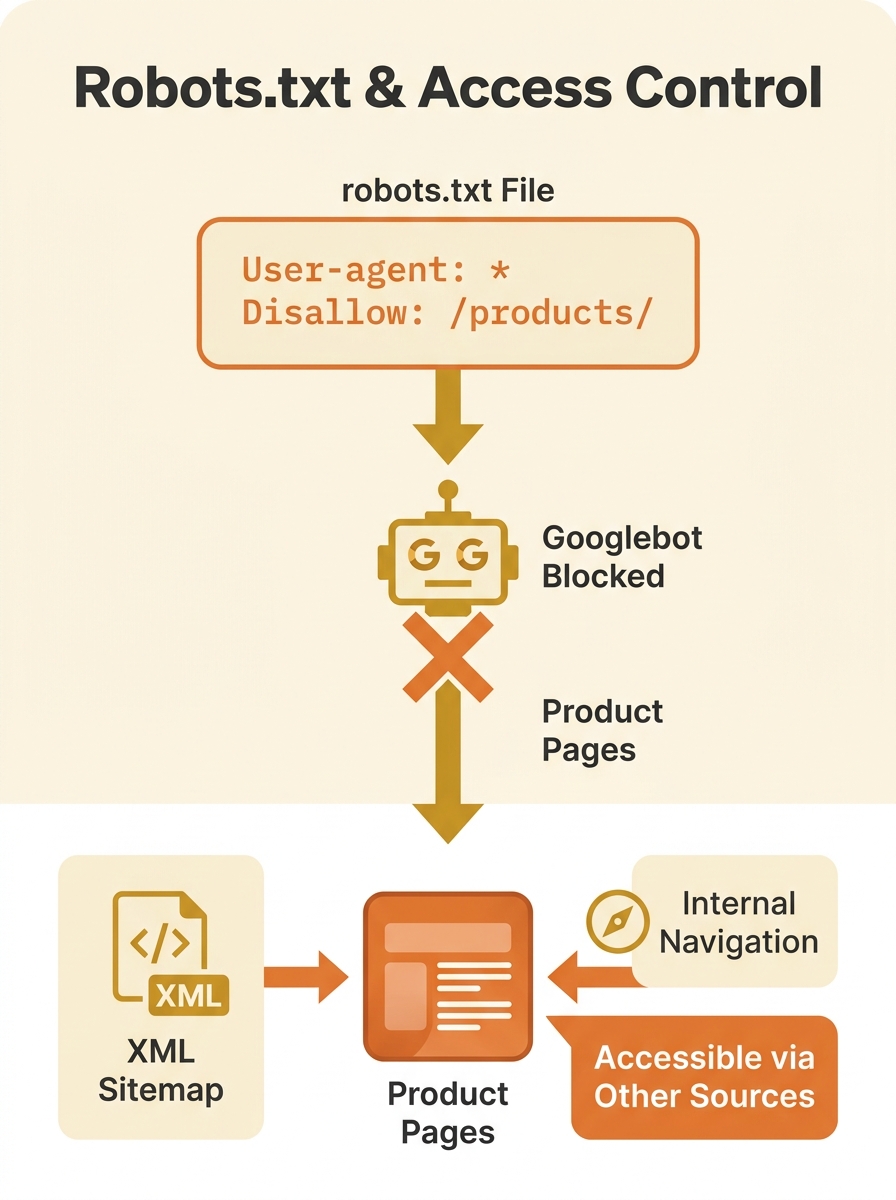
If you’ve been tracking how technical SEO debt accumulates for Australian businesses, this is one of the quietest and most expensive forms of it. The traffic decline is gradual. There’s no manual penalty, no algorithmic slap. Pages just stop appearing in search results, one by one, and nobody connects the dots because the robots.txt file hasn’t been touched in months.
“Indexed, Though Blocked” — The Status That Defies Logic
Google Search Console surfaces this conflict with a status message that reads like a contradiction: Indexed, though blocked by robots.txt. SEOptimer explains that this status indicates Google has found your page but has instructions to ignore it. The page exists in Google’s awareness, but Googlebot can’t actually access it to read the content, evaluate the on-page signals, or render the layout.
For eCommerce sites, this status tends to appear in bulk. You won’t see it on five pages. You’ll see it on five hundred, or five thousand, because the disallow rule applies to the entire directory. And every single one of those pages is consuming crawl budget for nothing. Google’s crawler visits the URL, gets told to go away, and logs the attempt. Then it comes back later and does it again. This is the definition of Google crawl budget waste — repeated attempts to access pages that the site’s own configuration won’t allow.
The instinct most site owners have at this point is to add a noindex meta tag to those pages, thinking that will clean up the Search Console report. This instinct makes the problem worse.
Warning: Google must be able to crawl a page in order to see a noindex meta tag or HTTP header. If robots.txt blocks access to the URL, the noindex directive is invisible to Googlebot. The two rules cancel each other out, and the page remains in a contradictory state indefinitely.
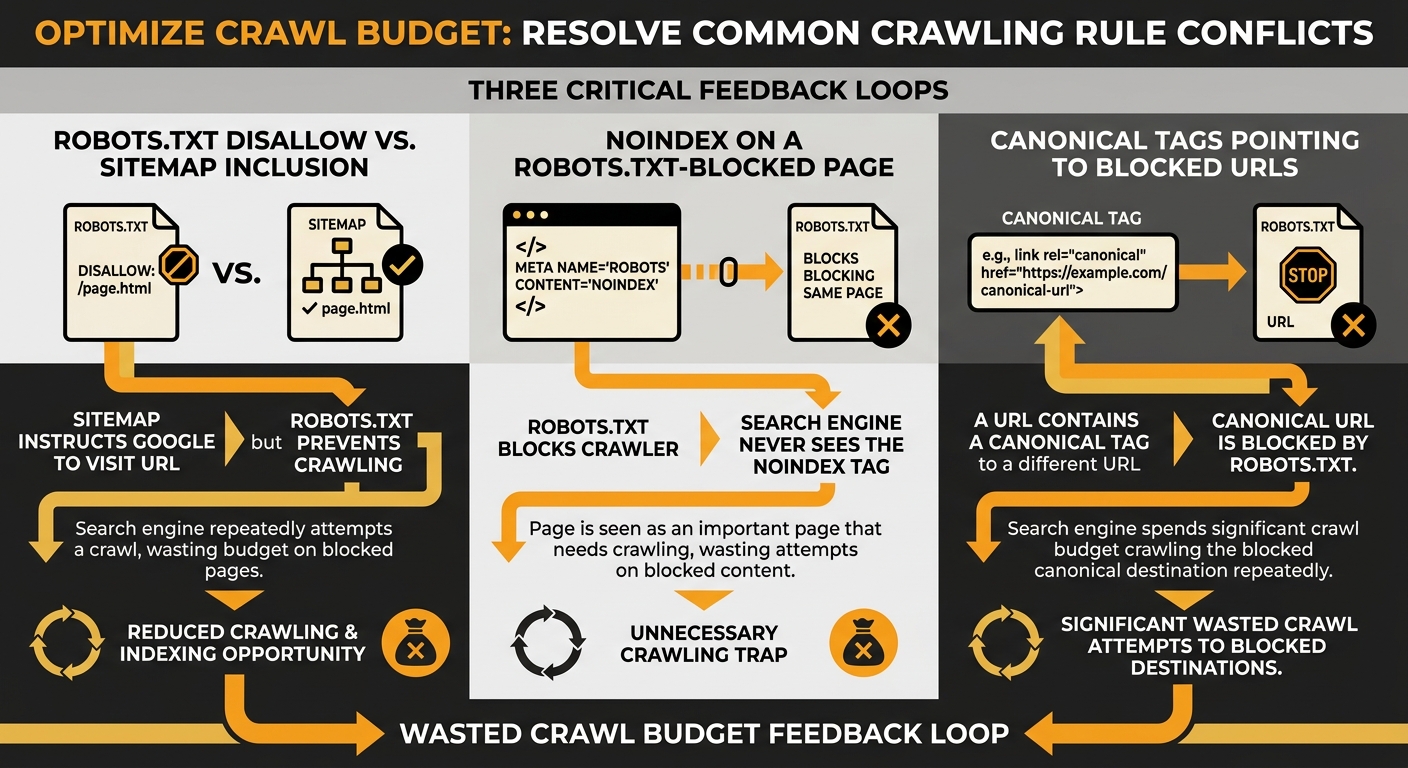
This is where crawling and indexing rules start working against each other at multiple levels simultaneously. The robots.txt says “don’t crawl.” The noindex says “don’t index, but you have to crawl me to know that.” And the sitemap says “please crawl this important URL.” Three directives, all pointing in different directions.
When Canonical Tags Point at Walled-Off Pages
The third layer of this conflict involves canonical tags, and it’s the one that does the most damage to rankings over time. On a typical eCommerce site, product pages generate multiple URL variations — filtered views, sorted views, paginated category pages, tracking-parameter URLs. Canonical tags exist to tell Google which version of a page is the authoritative one. When everything works, they consolidate ranking signals onto a single URL.
But when the canonical target is blocked by robots.txt, the entire chain breaks. As documented by DripRanks’ analysis of canonical tag failures, broken canonical targets waste crawl budget and prevent proper ranking consolidation. Google receives a signal saying “this URL over here is the real version,” follows that signal, and finds a wall. The ranking signals don’t consolidate. They scatter.
Three directives, all pointing in different directions — and your product catalogue pays the price in invisible ranking loss.
For Australian eCommerce sites running multi-region setups, this gets even messier. If you’re dealing with hreflang and canonical conflicts across regional URLs, a robots.txt block on one regional directory can corrupt the canonical chain for every locale. The signals ripple outward.
This specific combination — robots.txt blocking a directory that contains canonical targets referenced by other pages — is one of the hardest technical SEO misconfigurations to diagnose because no single tool flags the full picture. Your crawl report shows the disallow. Your canonical checker shows the tag. But unless you cross-reference them, you won’t see the conflict.
The Three-Step Deindexation Sequence
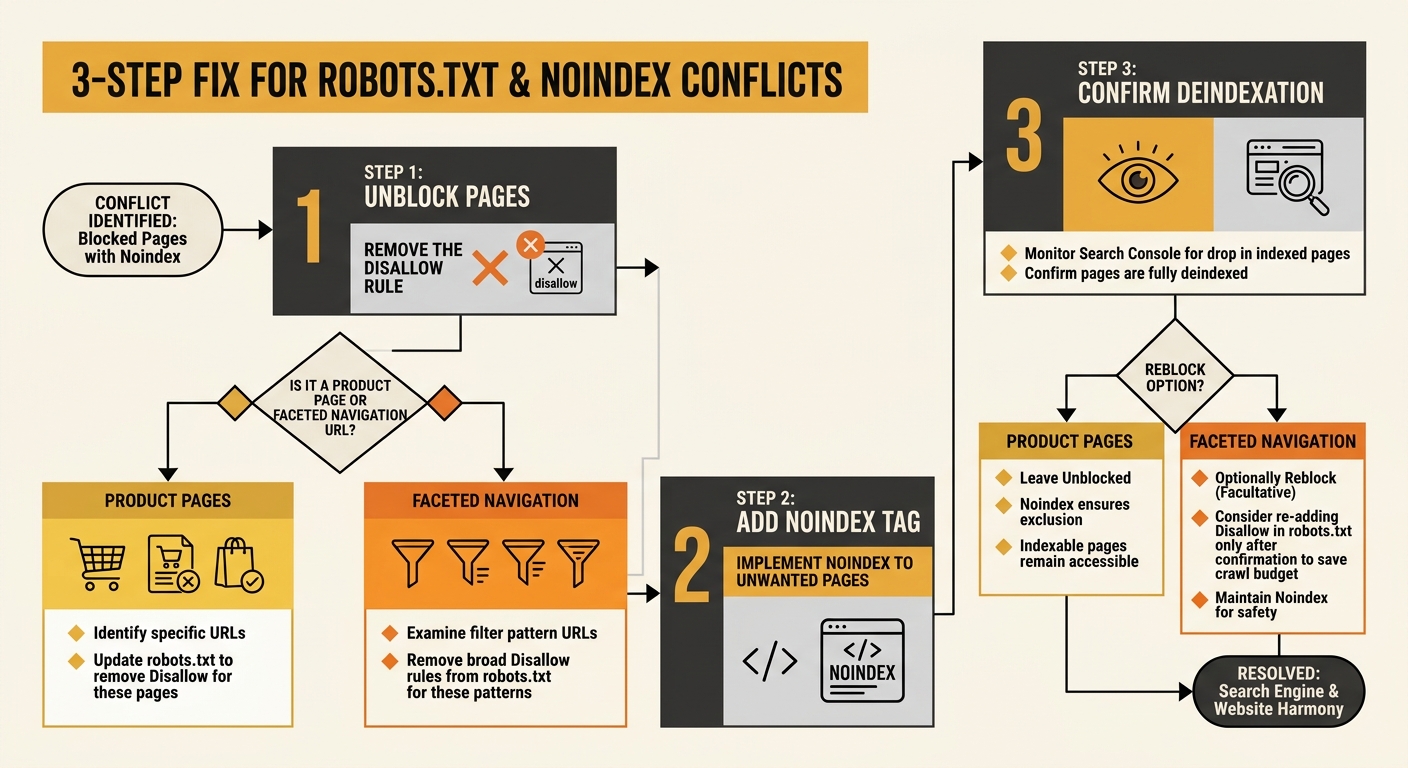
The fix for this pattern has a specific order, and getting the order wrong creates new problems. A well-documented approach shared across several technical SEO communities, including a detailed thread on r/TechSEO, lays out the sequence:
- Remove the robots.txt disallow rule first. This allows Googlebot to access the pages again. For product pages you actually want indexed, this is where the fix ends — update your canonical tags to point correctly, make sure the pages are in your sitemap, and let Google recrawl.
- For pages you genuinely don’t want indexed (staging URLs, internal search results, faceted navigation pages with no value), add a noindex meta tag or X-Robots-Tag HTTP header once the robots.txt block is removed. Google can now crawl the page, see the noindex directive, and process it.
- After Google has deindexed the unwanted pages (confirm via Search Console), you can optionally re-add robots.txt rules to reduce crawl load on those URLs. But the noindex tag is doing the actual deindexing work. The robots.txt rule only manages server load.
This sequence matters because reversing steps one and two — adding noindex while the robots.txt block is still active — achieves nothing. Google can’t see the noindex tag through the robots.txt wall.
For eCommerce sites with thousands of faceted navigation URLs, this process takes planning. You need to categorise which URLs should be indexable (product pages, key category pages) and which should carry noindex (filter combinations, sort-order variations, paginated deep pages). Tools like Screaming Frog and Sitebulb can cross-reference your robots.txt rules against your canonical tags and sitemap entries, but as we’ve explored with how SEO tools sometimes create false confidence, no single tool catches every conflict without manual review.
The Traffic Curve After the Directives Aligned
Once the robots.txt conflicts are resolved and the canonical chain is restored, recovery follows a predictable shape. Indexing speed picks up within one to two crawl cycles — typically a few days for smaller stores, a couple of weeks for catalogues with tens of thousands of URLs. Rankings for product pages start returning within 30 days as Google recrawls and reprocesses the content it can now actually see.
The harder recovery is the canonical tag consolidation. When canonical signals have been fragmented for months, Google has been distributing ranking authority across multiple URL variants instead of concentrating it. Reunifying that authority takes longer, often 60 to 90 days, depending on the site’s backlink profile and crawl frequency.
What makes this pattern particularly costly for eCommerce businesses is the compounding effect. Every week that product pages sit in the “Indexed, though blocked” state, they’re absent from search results while competitors occupy those positions. And because the architecture of your site’s internal linking keeps sending signals toward blocked pages, you’re burning link equity into a dead end at the same time.
The preventive measure is unglamorous but effective: audit your robots.txt file against your sitemap and canonical tags quarterly, or after any migration, platform update, or plugin change. Cross-reference the Coverage report in Google Search Console with your actual crawl directives. And treat robots.txt for what it actually is — a crawl management tool, not an indexing control mechanism. The distinction between those two functions sits at the centre of every robots.txt conflict we’ve dissected here, and confusing them is how eCommerce stores end up sabotaging their own visibility for months without realising it.