

The open-source seo-audit-skill repository on GitHub applies 108 distinct rules across 12 categories to any URL, covering Core Web Vitals, structured data, security headers, and accessibility. Point it at a typical multi-location eCommerce site’s location pages, and you’ll watch failures cascade. The reason is predictable: those pages were built outside the engineering workflow that governs the rest of the codebase.
This disconnect defines how most eCommerce businesses handle developer local SEO. The product pages run through pull requests, code review, automated testing, and staged deployments. The location pages? Someone in marketing created them in a WYSIWYG editor, pasted in a Google Maps embed, and published without a single automated check.
For any eCommerce business operating across multiple Australian cities or regions, that gap between engineering standards and local content quality is where rankings die.
Why Location Pages Keep Failing Technical Audits
The pattern repeats across retail, hospitality, and SaaS companies with physical or regional presence. Location pages tend to share a handful of common defects:
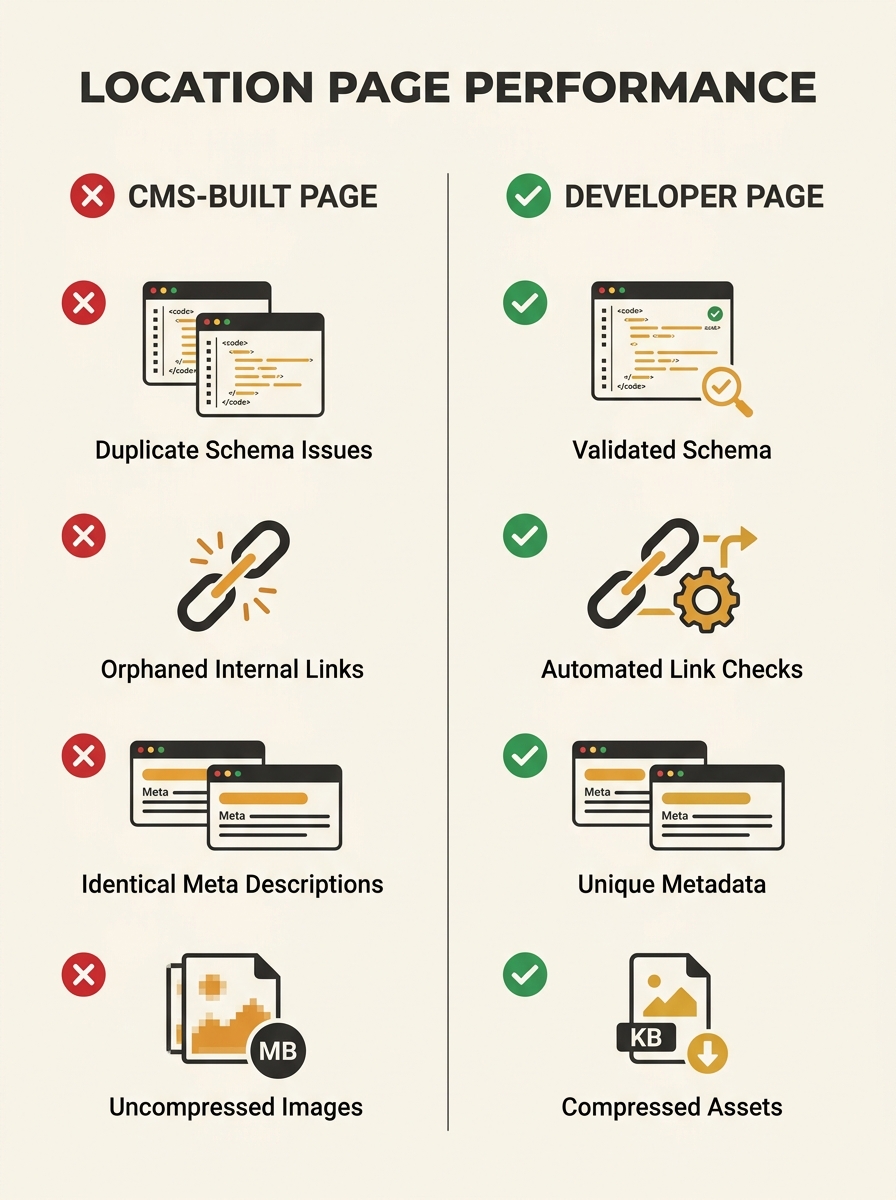
- Missing or duplicate structured data. The LocalBusiness schema was copied from one page to the next without updating the address, phone number, or geo-coordinates.
- Identical meta descriptions across every city page, with only the suburb name swapped in.
- No internal linking strategy. Location pages sit orphaned, reachable only through a footer dropdown or sitemap. If you’ve ever run an internal link audit looking for orphaned pages, location pages are almost always the worst offenders.
- Slow load times caused by unoptimised hero images uploaded through a CMS media library without build-step compression.
These aren’t obscure edge cases. They’re the default outcome when location pages live outside version control.
Treating Location Pages as Code
The fix is conceptual before it’s technical: treat every location page the same way you treat product pages. That means source control, templating, automated validation, and deployment pipelines.
Here’s what a developer-first approach to location pages for SaaS and eCommerce actually looks like in practice.
A single template, many data files
Instead of manually creating each location page, you define one template and feed it structured data. Whether you’re using a static site generator like Hugo or Eleventy, or a framework like Next.js or Nuxt, the principle is identical: one layout component that accepts location-specific variables (address, phone, trading hours, service area, staff bios, customer reviews) from a data file.
For a retailer with 30 stores across Australia, that’s 30 JSON or YAML files in a directory, each containing only the data unique to that location. The template handles the HTML structure, the schema markup, the internal linking logic, and the image optimisation.
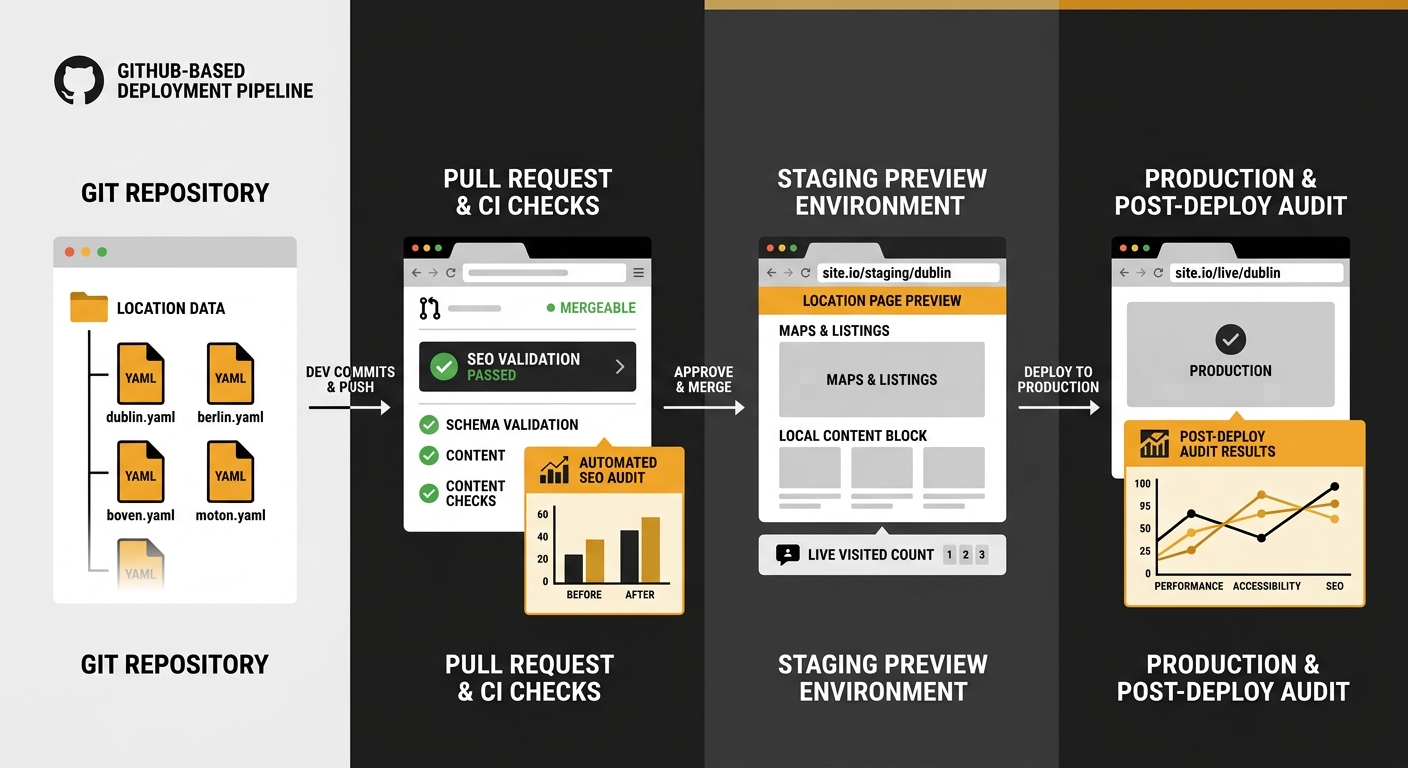
Changes to the shared template deploy everywhere at once. Changes to a single store’s data file deploy only to that page. Both go through pull requests. Both get reviewed.
Automated SEO validation in CI/CD
This is where GitHub-ready local content goes from a nice idea to a real competitive advantage. Two tools are worth knowing about.
The markdown-seo-check GitHub Action validates markdown files against SEO best practices on every pull request. It creates a PR comment and fails the build if conditions aren’t met. For teams that author location content in markdown (common with static site generators), this catches missing titles, descriptions, and heading structure before the page ever reaches production.
For broader audits, the seo-audit-skill CLI tool can run as a post-deploy check. With 108 rules spanning structured data validation, accessibility checks, and Core Web Vitals assessment, it surfaces the exact issues that cause location pages to underperform.
Neither tool replaces human SEO thinking. But they prevent the lazy, repeated mistakes that accumulate when you’re managing 20, 50, or 200 location pages.
The URL Structure That Scales
Multi-location technical SEO lives or dies on URL hierarchy. The dominant pattern among sites that rank consistently across multiple cities follows a clean subfolder structure:
- /locations/melbourne/
- /locations/sydney-cbd/
- /locations/brisbane-south/
Each slug is descriptive, contains the location name, and sits under a parent directory that Google can crawl efficiently. This matters for how search engines interpret your site navigation and for crawl budget allocation across a growing set of pages.
One critical mistake to avoid: don’t target location-specific keywords on your homepage. As one practitioner noted in a Reddit thread on multi-location architecture, you need to shift the homepage to national brand content and remove any location-specific keyword targeting from it. The homepage should communicate your brand, your products, your value proposition. Let the location pages do the geo-targeting work.
Tip: When building location page URLs programmatically, generate slugs from the location data files rather than letting authors create them manually. This prevents inconsistencies like /locations/Melb/ versus /locations/melbourne/ and keeps your URL structure audit-proof.
Structured Data That Google Can Actually Use
Google’s own documentation reveals how it evaluates local prominence. The Nearby Search API documentation states that “ranking will favour prominent places within the set radius over nearby places that match but that are less prominent.” Prominence is affected by a place’s ranking in Google’s index, global popularity, and other factors.
What does this mean for your location pages? Structured data accuracy feeds directly into how Google assesses your business locations against competitors. Every LocalBusiness schema instance needs to be precise:
- @type should be as specific as possible (Store, Restaurant, MedicalBusiness) rather than the generic LocalBusiness
- geo coordinates must match the actual business address, not the city centre
- openingHoursSpecification should reflect real trading hours, including public holiday variations
- areaServed helps Google understand your service radius
When you generate schema from data files in your repository, accuracy becomes a data quality problem rather than a content editing problem. A developer can write a validation script that checks every location’s JSON-LD against a defined schema spec before the build completes.
When you generate schema from data files in your repository, accuracy becomes a data quality problem rather than a content editing problem.
The consequences of getting this wrong are real. Inconsistent NAP (name, address, phone) data across your location pages and your Google Business Profiles is one of the most common ways businesses accidentally create duplicate local SEO profiles and tank their rankings.
Developer-Focused Geo-Targeting Beyond the Page
Location pages are the foundation, but developer-focused geo-targeting extends into areas that traditional SEO teams rarely touch.
Google’s Places Aggregate API can generate dynamic, custom location scores based on the density of places within a defined geographic area. For eCommerce businesses with physical locations, this data can inform which locations deserve more content investment. A store in a high-density commercial area competes differently from one in a regional town, and your content strategy should reflect that.
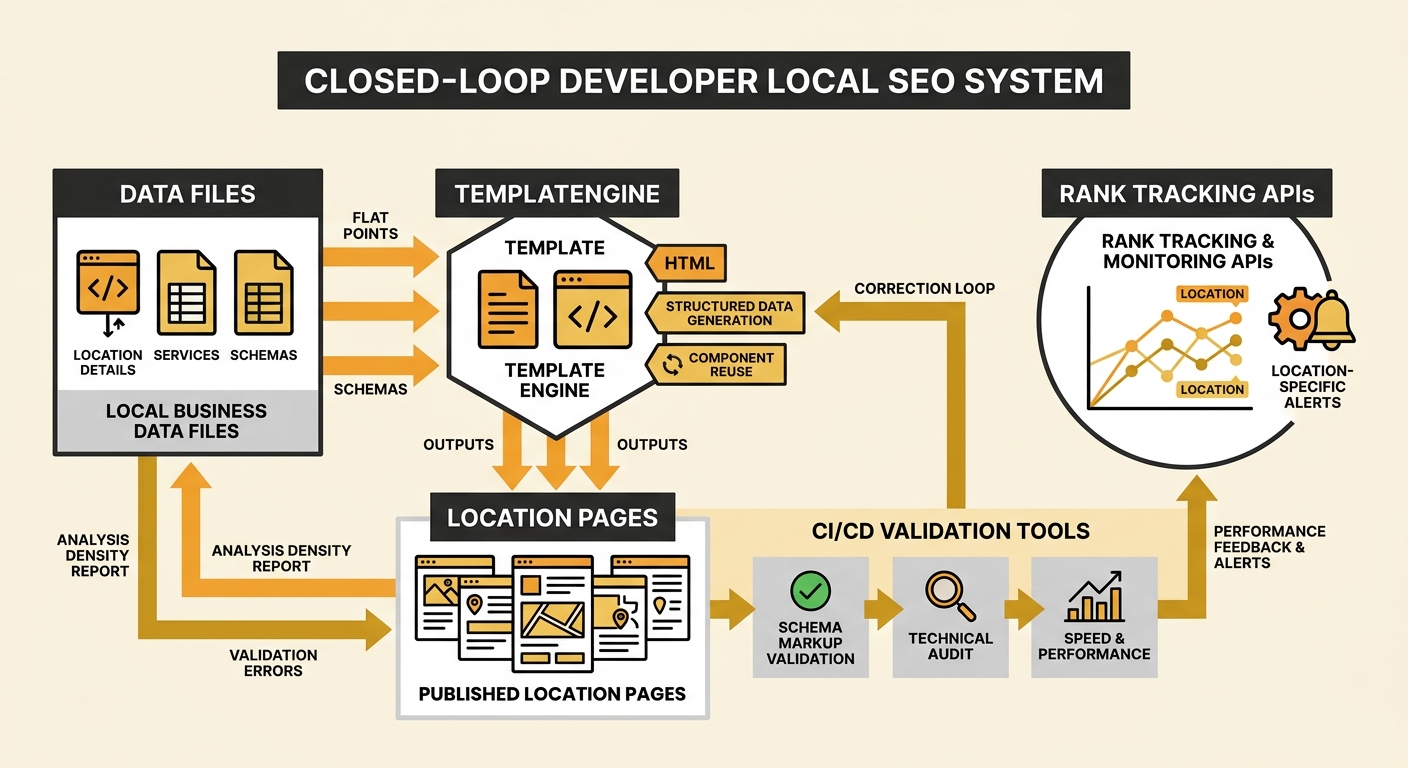
For teams tracking keyword performance by location, tools like Advanced Web Ranking’s developer API allow you to track keyword rankings in specific locations and pull that data into your own dashboards. This is particularly useful for multi-location technical SEO because you can automate alerts when a specific branch’s page drops out of the local pack.
Pairing this location-level tracking with strong citation consistency and AI overview optimisation gives you a closed loop: your codebase generates the pages, your CI/CD pipeline validates them, and your monitoring tools flag when specific locations need attention.
Scaling Content Without Scaling Thin Pages
The biggest risk with programmatic location pages is creating thin content that Google treats as doorway pages. Every location page needs unique, substantive content that justifies its existence.
From a developer workflow perspective, your data files need to include fields for:
- A unique location description (150+ words minimum) that mentions genuine local details
- Location-specific customer reviews or testimonials
- Staff information relevant to that branch
- Local service area details, including suburbs served
- Unique imagery of the actual location
This is where SEO content services and engineering teams need to collaborate closely. The template can enforce minimum content requirements: a build that fails if the description field contains fewer than 150 words, or if the image path points to a generic placeholder rather than a location-specific photo.
As one detailed multi-location SEO guide emphasises, expanding your online presence for local search gets exponentially harder when you add multiple locations. The developer-first approach doesn’t eliminate that complexity, but it makes it manageable by breaking the problem into repeatable, testable components.
And those components compound. When you fix a schema bug in the shared template, 30 pages improve overnight. When you add a new structured data field to support AI search visibility, every location gets it on the next deploy. The marginal cost of maintaining location pages drops to near zero, while the quality bar stays high.
What The Numbers Still Can’t Answer
The 108-rule audit tool will tell you whether your structured data is valid. Rank tracking APIs will tell you where each location page sits in the SERPs. Build-step validation will catch missing metadata before it reaches production.
But none of these tools can tell you whether your Melbourne CBD page actually reads like it was written by someone who knows Melbourne CBD. They can’t evaluate whether your location-specific content feels genuine or whether it’s boilerplate with a suburb name injected. Google’s helpful content systems are built to detect exactly that kind of pattern at scale.
The developer-first approach to location pages solves the engineering problems: consistency, validation, deployment, monitoring. The content quality problem remains stubbornly human. The eCommerce businesses that rank across multiple locations in Australia are the ones that treat both sides with equal seriousness, applying engineering rigour to the infrastructure and genuine local knowledge to the words on the page.