
Three distinct approaches exist for diagnosing organic traffic drops, and Australian SMEs consistently pick the wrong one for their situation. Paid suites like Semrush cost $130+/month. Free audit tools scan surfaces in minutes. A structured manual workflow through Google Search Console costs nothing, catches deeper problems, and requires no subscription.
TL;DR: Paid tool suites find problems fastest but cost $130–$250/month. Free automated audit tools flag surface issues but produce high false-positive rates. A structured six-step manual workflow through Google Search Console is slower but catches the crawl, indexing, and content problems that actually kill traffic for small businesses. Choose based on your budget and SEO confidence, not marketing.
When your pages disappear from search results, the damage extends well past lost clicks. Your competitors absorb the positions you held. Your brand’s search presence erodes, and potential customers encounter your rivals before they ever see your name. For Australian SMEs, where long-tail keyword strategies deliver 23% higher ROI from blog content compared to broad keyword targeting, a traffic drop compounds into both revenue loss and reputational damage simultaneously. To fix organic traffic drops in Australia without burning cash on the wrong tools, you need to match the right diagnostic method to your actual problem.
Paid Tool Suites: Semrush, Ahrefs, and the Full Dashboard
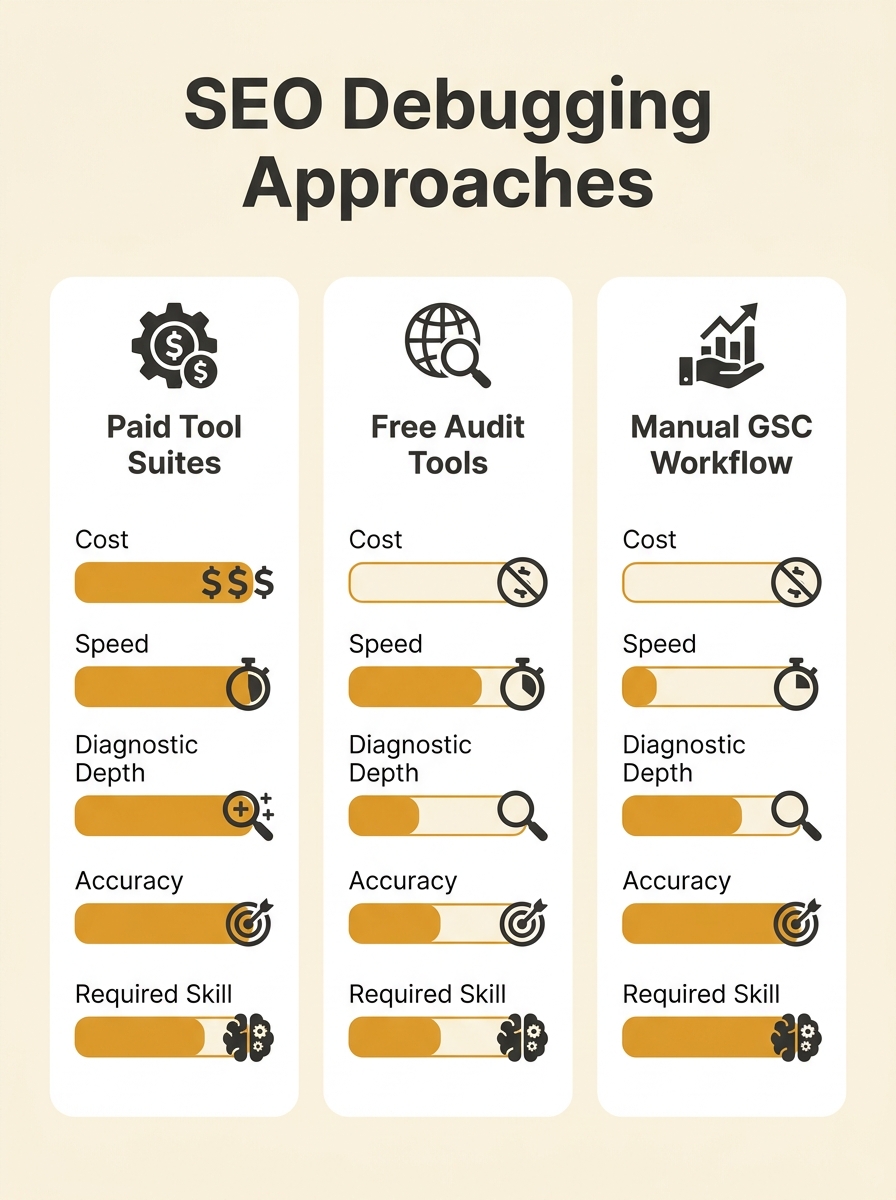
Paid platforms deliver the broadest diagnostic view available: crawl audits, backlink monitoring, ranking tracking, competitor gap analysis, and content scoring wrapped into a single interface. For businesses already subscribing, they offer the fastest path to identifying technical SEO issues. Semrush’s site audit scans for crawl errors, broken redirects, orphan pages, and Core Web Vitals problems automatically. Ahrefs covers similar ground with stronger backlink intelligence.
The tradeoff is cost. Semrush’s Pro plan sits at US$139.95/month. Ahrefs Lite starts at US$129/month. For an Australian SME spending $2,000–$5,000/month on total marketing, those subscriptions eat 3–7% of budget before producing a single fix. We’ve compared how Ahrefs and Semrush stack up for Australian local data in detail, and both tools carry substantial capability overlap for small business use cases.
Where paid suites genuinely earn their cost is backlink analysis. The r/seogrowth community’s consensus diagnostic workflow advises operators to “audit technical SEO, backlinks and content relevancy using tools like Google Analytics and Search Console to identify and fix issues quickly.” Paid tools make the backlink piece far more efficient because Google Search Console’s backlink data is limited and delayed by days.
But paid suites also generate noise. A typical Semrush crawl audit surfaces 50–200 “issues” per scan on a small business website. Many are cosmetic warnings (missing alt text on decorative images, slightly long title tags) rather than genuine traffic killers. If you don’t know which issues are urgent and which are noise, the dashboard creates more confusion than clarity. An SME owner who sees 147 “errors” and 312 “warnings” can spend weeks chasing problems that have zero impact on rankings.
Best fit: SMEs already paying for these tools, or businesses with enough SEO knowledge to filter signal from noise in large automated reports.
Free Automated Audit Tools: SEOptimer, SEOmator, and Free Checkers
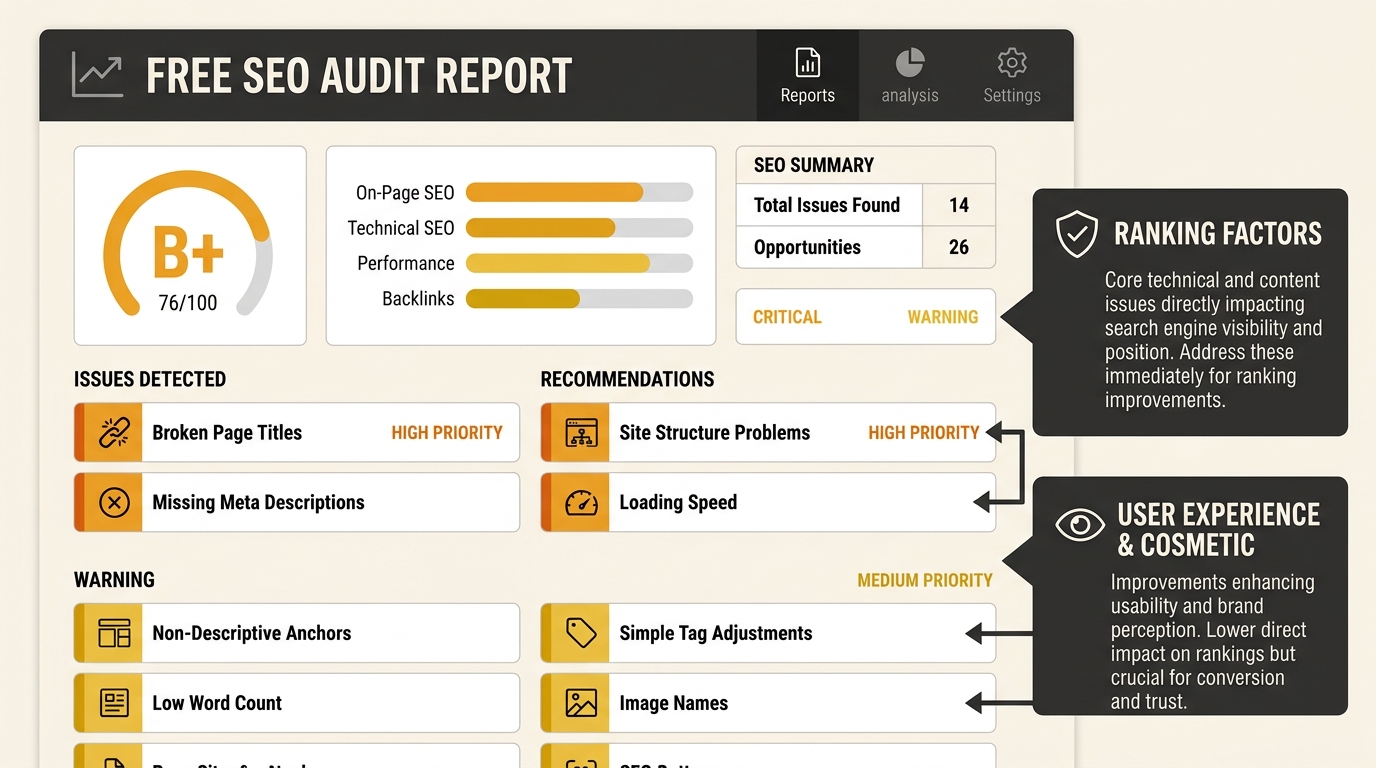
Free audit tools like SEOptimer, SEOmator, and Semrush’s free SEO checker let you enter a URL and receive a scored report within minutes. They scan for missing meta descriptions, slow page speed, mobile usability problems, broken links, and basic schema issues. SEOptimer generates graded reports across performance, SEO, usability, and social metrics. SEOmator runs broader structural analysis including internal linking patterns. As free SEO diagnostic tools go, they’re the lowest-friction entry point available.
These tools are genuinely useful as a first-pass screen. If you’ve never run any diagnostic on your site, a free audit tool will surface the obvious problems: missing H1 tags, pages without meta descriptions, images loading at 3–4MB. For Australian SMEs working on zero budget, they provide a starting point that beats guessing.
The limitation is depth. Free audit tools scan your site the way a search engine’s initial crawl does: they examine what’s publicly visible on the page. They don’t tell you whether Google has actually indexed those pages. They don’t check whether your pages are being served differently to Googlebot than to browsers, which is a rendering gap that causes real indexing failures. And they can’t assess content relevance against search intent, the factor Google’s core updates have consistently rewarded above raw domain authority.
Search Engine Land’s SEO debugging framework identifies five diagnostic categories: “crawl errors, rendering issues, indexing blockers, ranking drops, and SERP changes.” Free tools address the first of those five categories reliably. The remaining four require either paid tools or manual investigation through GSC. For SMEs dealing with a genuine traffic collapse rather than surface-level technical hygiene problems, free audit tools alone aren’t going to find the cause.
Best fit: Complete beginners who need to identify obvious problems, or as a quick pre-check alongside a deeper manual review.
The Manual GSC Workflow: Six Steps, Zero Spend
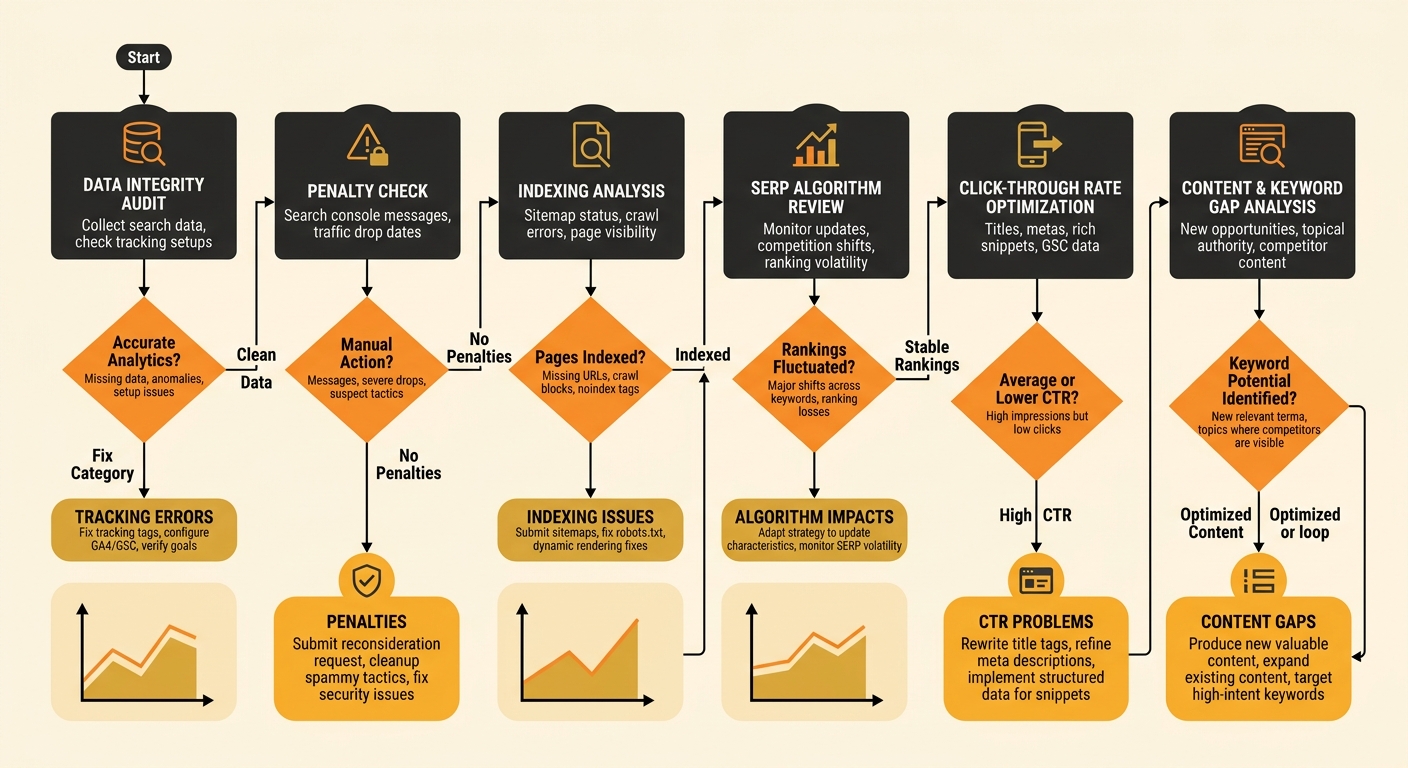
Google Search Console is the only free SEO diagnostic tool that shows you what Google actually sees: which pages are indexed, which are excluded, which queries drive impressions, and where clicks are falling. A structured six-step manual workflow through GSC catches the problems that automated tools miss because it follows the same diagnostic logic experienced SEOs use when they troubleshoot client sites.
The six steps, synthesised from diagnostic frameworks published by SEO Emirates and Thrive Agency’s recovery methodology:
- Check tracking integrity. Verify your analytics code hasn’t been removed, duplicated, or broken by a recent site update. A surprising number of apparent “traffic drops” are measurement errors caused by plugin updates or theme changes.
- Check for manual actions. In GSC under Security & Manual Actions, confirm Google hasn’t penalised your site. This takes 30 seconds and rules out the most severe possible cause immediately.
- Check indexing status. Under Pages in GSC, review which URLs are indexed and which are excluded, with reasons. Look for sudden spikes in “Crawled — currently not indexed” or “Discovered — currently not indexed.” These patterns signal content quality or crawling configuration problems that automated tools almost never flag properly.
- Check for algorithm updates. Cross-reference your traffic drop date against Google’s confirmed update timeline. If the drop aligns with a core update, the fix is content-focused, not technical. Many Australian SME ranking drops turn out to be self-inflicted content problems rather than infrastructure failures.
- Diagnose CTR versus ranking changes. In GSC’s Performance report, filter by page and check whether impressions held steady while clicks dropped. SEO Emirates’ diagnostic guide states it plainly: “Check if impressions remain stable but clicks drop. That’s a CTR issue — not ranking issue. Improve title tags & meta descriptions.” This single check prevents SMEs from spending weeks on technical fixes when the real problem is poor search snippets.
- Review content against competitor SERPs. Manually search your target keywords and compare what’s ranking against your pages. If competitors now offer deeper, more specific content, the gap is informational, and no amount of technical SEO troubleshooting will close it.
The structured manual workflow catches indexing, crawl, and content problems that free audit tools miss entirely, and it costs nothing to run.
The tradeoff is time and skill. Each step requires you to interpret what GSC is showing you. Understanding indexing exclusion reasons, distinguishing a crawl budget problem from a content quality signal, reading CTR trends correctly: these skills develop with practice. An SME owner running this technical SEO troubleshooting system for the first time should budget 2–3 hours for a thorough pass, compared to 5 minutes with an automated tool.
Tip: Run step 5 (CTR vs ranking) first if you’re short on time. It’s the fastest way to determine whether your traffic drop is a visibility problem or a click-through problem, and the fixes for each are completely different.
The Comparison at a Glance
| Feature | Paid Suites (Semrush/Ahrefs) | Free Audit Tools | Manual GSC Workflow |
|---|---|---|---|
| Monthly cost | $130–$250 USD | $0 | $0 |
| Time to first insight | 10–15 minutes | 3–5 minutes | 45–90 minutes |
| Crawl error detection | Strong | Moderate | Strong (via GSC data) |
| Indexing diagnosis | Moderate | Weak | Strong |
| Content relevance check | Moderate (content scoring) | None | Manual but accurate |
| Backlink analysis | Strong | Weak | Limited |
| False positive rate | Moderate | High | Low |
| SEO knowledge required | Moderate | Low | High |
How to Choose Between These Three
The right approach depends on two variables: your budget and your SEO confidence.
If you’re already paying for Semrush or Ahrefs, start there for the broadest automated scan, then validate anything flagged as critical through GSC’s indexing and performance reports. The paid tool accelerates discovery; GSC confirms whether the issue actually affects Google’s view of your site.
If you’re on zero budget and have never touched SEO debugging for small business before, run a free audit tool first. It won’t catch everything, but it surfaces basic technical hygiene problems: broken links, missing meta descriptions, page speed failures. Then work through steps 3–6 of the manual workflow to find the deeper indexing and content problems that free tools miss.
If you’re comfortable reading GSC data, skip the automated tools entirely and run the six-step manual workflow. It’s the most accurate diagnostic path available without spending money, and it follows the same logic that agencies bill $150–$300/hour to execute. As the Waypoint Digital guide to Australian small business SEO emphasises, understanding honest diagnostic processes matters more than tool subscriptions for SMEs working within tight budgets.
The worst choice is doing nothing and hoping traffic recovers by itself. For Australian SMEs, organic search visibility functions as the primary digital shopfront. When that visibility drops, every week of inaction compounds the reputational damage as competitors absorb the search positions you once held. Pick the approach that matches your budget and skill level, run it within the next 48 hours, and you’ll have a clear diagnosis of what broke and where to direct your effort.