

Feeding a 347-line audit spreadsheet to your development team will get fewer issues fixed than feeding them a list of six. This is the central failure of technical SEO prioritisation in practice: the audit itself becomes the bottleneck, not the issues it uncovers. The report lands, development groans, nothing moves for weeks, and meanwhile the handful of genuinely damaging problems sit somewhere around row 214, quietly eroding your site’s reputation with every user who bounces off a broken page or security warning.
The standard approach to technical SEO audits promises a clean, healthy site. What it actually delivers is paralysis, burnout, and a growing backlog that makes your online presence look worse to both Google and your customers with each passing quarter. For Australian SMEs spending $3,000 to $10,000+ per month on SEO, that’s a brutal return.
Three pieces of evidence explain why this happens and how a proper audit issue triage changes the outcome.
Template-Level Fixes Are Worth Fifty Times More Than Instance Fixes
Every audit tool on the market reports issues at the URL level. You get a flat list: this page has a missing H1, that page returns a 404, another page has a duplicate canonical. The list balloons because the same underlying problem generates hundreds of individual warnings. A broken product card template on a 400-SKU ecommerce site doesn’t show up once. It shows up 400 times.
The distinction between template-level and instance-level issues is where most triage frameworks either succeed or collapse. As Truelogic’s research on technical SEO triage puts it plainly: template fixes are almost always higher priority because they resolve hundreds or thousands of individual warnings at once.
An Australian SME SEO workflow that treats each of those 400 product-page warnings as a separate ticket will drown any development team. A workflow that identifies the single template causing all 400 will get a fix shipped in one sprint. Same audit, same issues, radically different execution speed.
Here’s a practical test you can apply to any line item in your audit report: “If I fix this once, does it fix one URL or many?” If the answer is many, that issue jumps to the top of your list regardless of what severity label the tool assigned it.
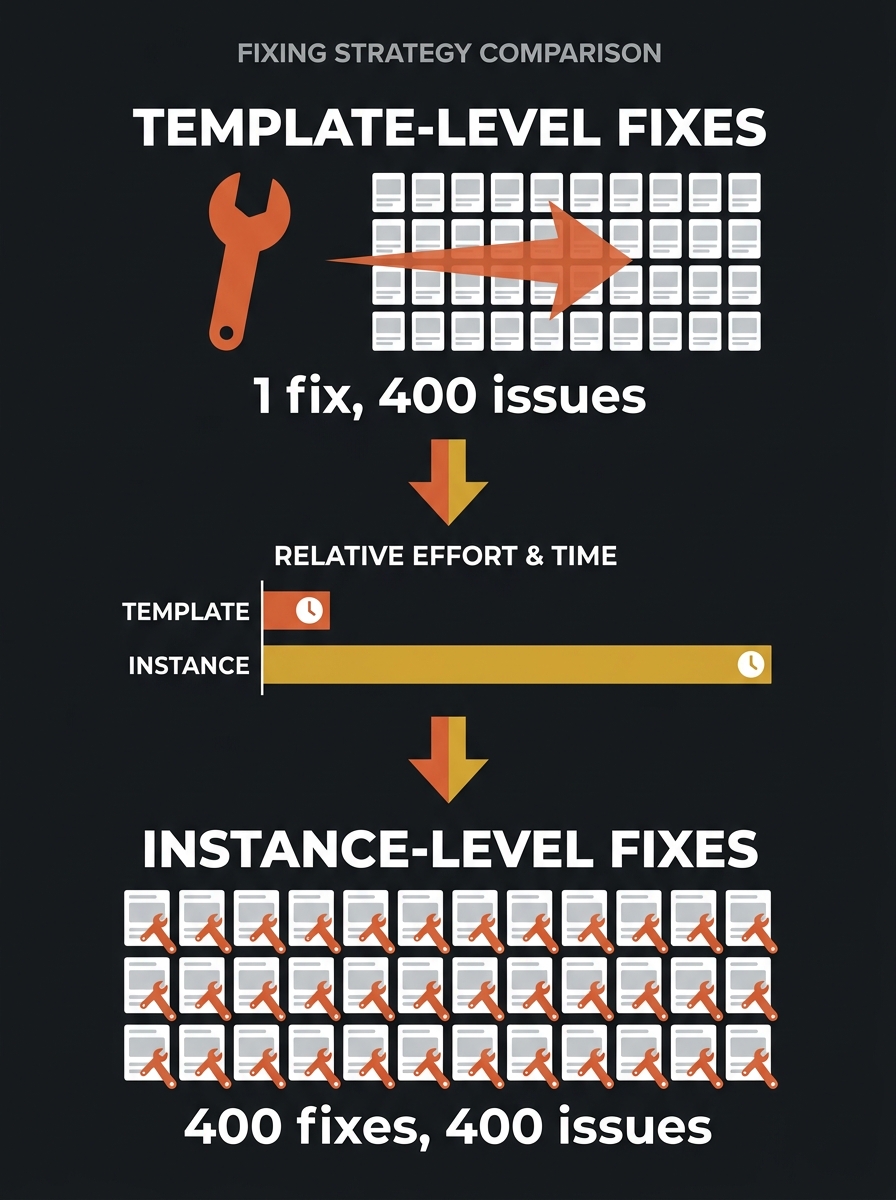
This might sound obvious when stated plainly. But watch how teams actually behave after an audit. They sort by severity (critical, warning, notice), pick off the first few critical items, get bogged down in instance-level fixes that each require different pages and different context, and lose momentum before they ever reach the template-level issue that generated 60% of the report’s line items. If your team has been diagnosing mysterious ranking drops without improvement, this pattern is often the reason.
Three Buckets Beat a Severity Score Every Time
SEO tools assign severity labels — critical, high, medium, low — based on what the issue is. A 5xx server error is always flagged critical. A missing alt attribute gets a medium. But these labels ignore two things that matter enormously in practice: how much traffic the affected pages carry, and how much effort the fix requires.
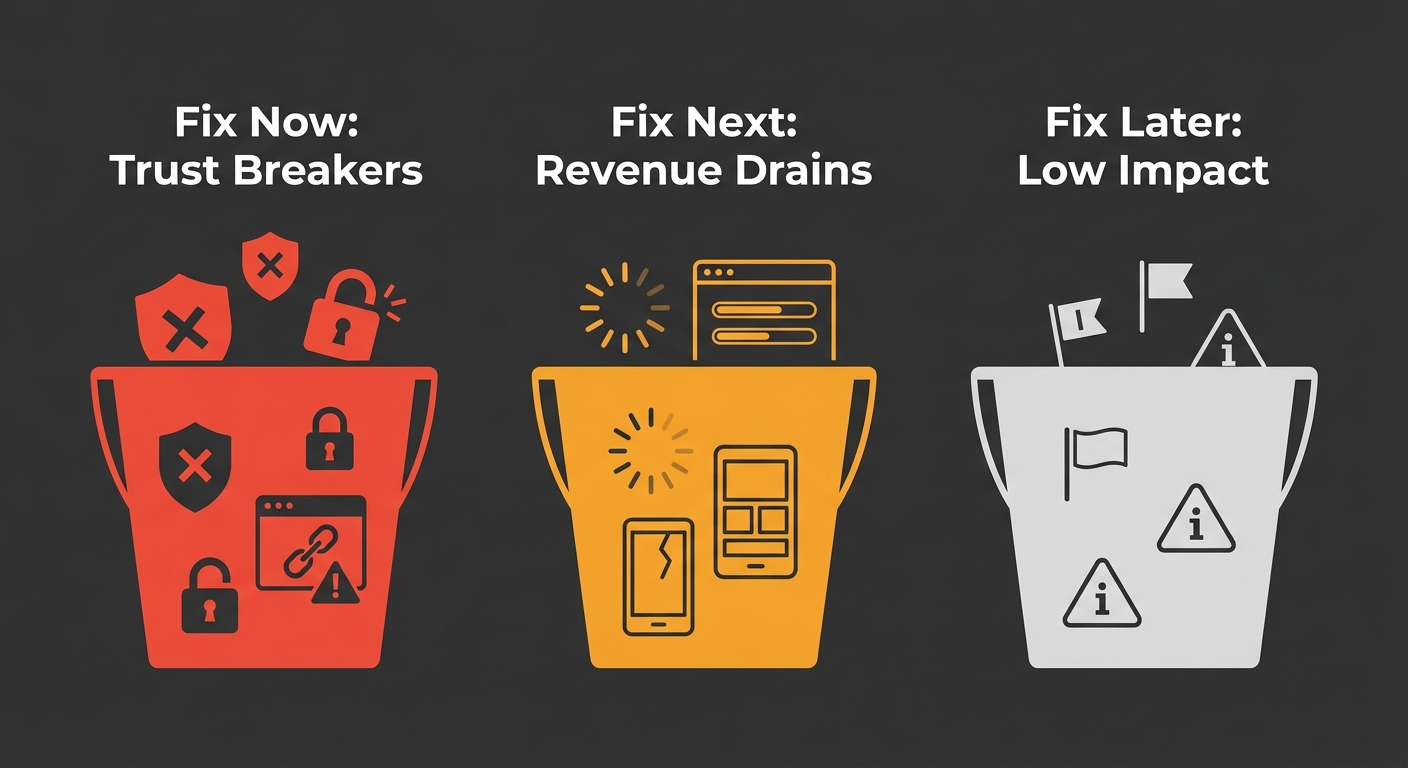
A severity matrix for SEO impact scoring that accounts for business outcomes looks different from what the tools produce out of the box. The triage protocol that works in the real world sorts every issue into three simple buckets, connecting technical fixes to business outcomes rather than treating the audit as an abstract checklist.
Bucket 1: Fix now (these are breaking trust)
Accidental noindex tags on production pages. Widespread 5xx server errors. Expired SSL certificates. Broken checkout or enquiry flows. These issues don’t just hurt rankings. They actively damage your brand’s reputation with every visitor who encounters them. A customer who sees a browser security warning on your site forms an opinion about your business in under two seconds, and that opinion rarely involves giving you their credit card details.
This bucket also includes situations where your robots.txt and meta tags contradict each other, blocking Googlebot from pages you need indexed. If Google can’t see your most important content, your competitors fill that space in search results. Your brand becomes invisible precisely when people are looking for what you sell.
Bucket 2: Fix next (these are costing you money)
Core Web Vitals failures on high-traffic pages. Mobile usability issues. Canonicalisation conflicts on product or service pages. For every additional second of mobile load time, conversion rates can drop by up to 20%. These issues aren’t emergencies in the same way a 5xx error is, but they compound. A slow site that’s technically functional still pushes users toward faster competitors, and the revenue impact is real even when it’s invisible in your analytics because those users never converted in the first place. If you’ve been working on page speed and image compression order, the fixes in this bucket represent the logical next layer.
Bucket 3: Fix later (or possibly never)
Missing alt text on decorative images. Broken outbound links to third-party sites. Minor schema additions on low-traffic pages. Orphaned blog posts from three years ago. These issues fill audit reports but move no commercial needle. They’re the line items that make a 300-issue report feel overwhelming, and the correct response to most of them is to put them on a backlog and revisit quarterly.
Sixty-seven per cent of in-house SEO teams cite lack of developer bandwidth as the top barrier to implementation. The triage exists to spend that scarce bandwidth on the six things that matter, not the sixty that don’t.
The bucket system works because it mirrors how development teams already think about their own work. Developers understand severity tiers and sprint prioritisation. What they don’t understand — and shouldn’t have to — is why a particular SEO issue matters more than another when both are flagged “critical” by a tool. Your job is to translate. “Googlebot can’t render the product grid because a third-party JavaScript file returns a 404” is actionable. “57 pages have render-blocking resources” is not.
Technical Debt Becomes Reputation Debt Faster Than You Think
Here’s where the connection between technical SEO prioritisation and reputation management gets uncomfortably direct.
Google’s log file data consistently shows that over one-third of Googlebot’s crawl requests on large sites hit non-indexable URLs — parameter pages, soft 404s, and redirect chains that go nowhere useful. Every crawl cycle Googlebot spends on these dead ends is a cycle it doesn’t spend on your actual content. The practical result: fresh pages take longer to appear in search results, updated content stays stale in Google’s index, and your competitors’ well-maintained sites show up where yours should be.
For Australian businesses competing in local markets, this is a direct reputation problem. When a potential customer searches for your service and finds a competitor instead because your pages aren’t being crawled efficiently, you’ve lost that interaction before it started. When they do find your site and hit a 404, a slow-loading page, or a mixed-content warning, you’ve lost it again. The tracking rhythm you use to monitor these issues determines whether you catch the decay early or discover it after three months of declining leads.
And the burnout angle matters for reputation too. Teams that try to tackle all 300+ issues simultaneously tend to abandon the effort entirely after a few weeks. The audit report becomes a document everyone avoids opening. Critical issues that appeared after the initial audit — a new staging page accidentally left indexable, a CDN change that broke canonical tags — never get triaged because nobody wants to add more items to an already-overwhelming list.
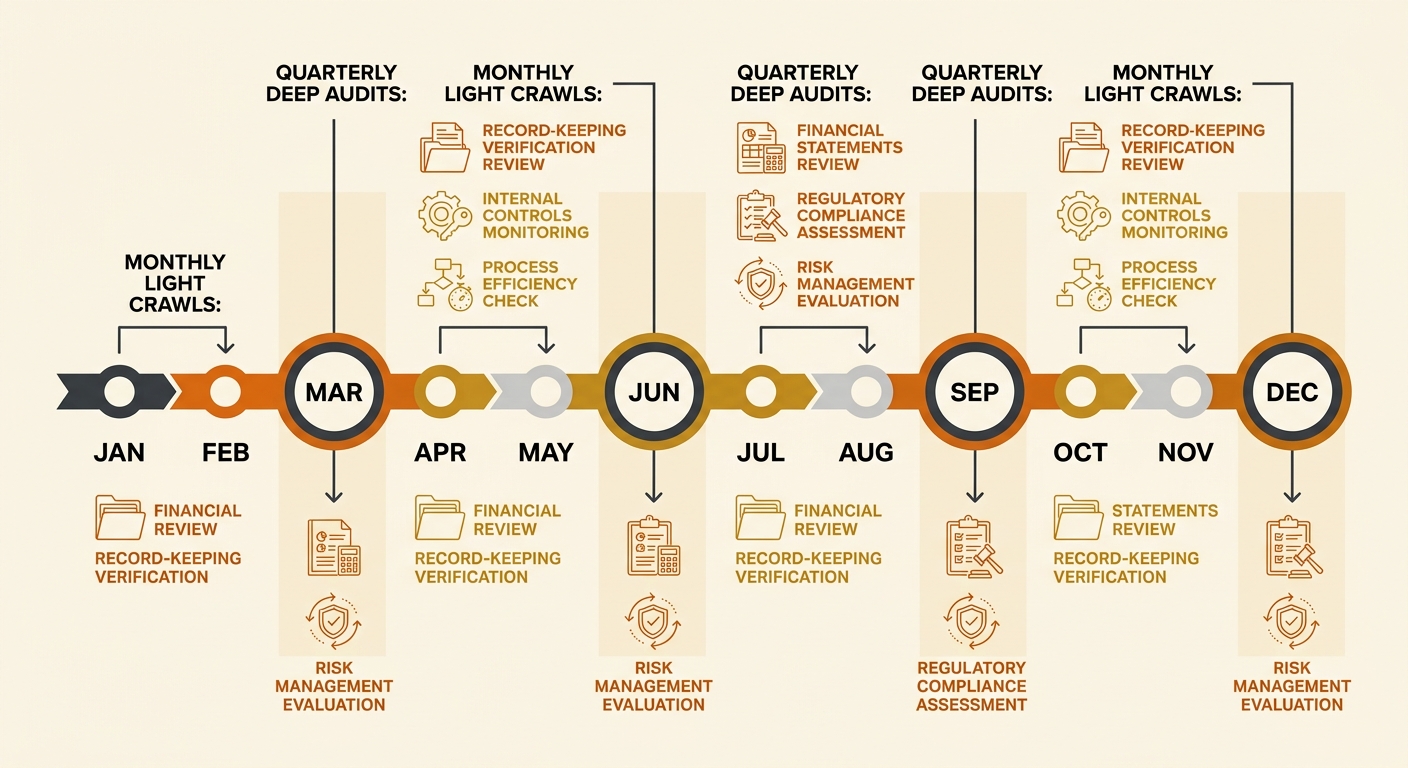
The better pattern is quarterly deep audits paired with monthly light crawls. The deep audit rebuilds your bucket assignments. The monthly crawl catches new critical issues before they compound. This is the Australian SME SEO workflow that actually survives contact with reality: structured, repeatable, and scoped tightly enough that the people doing the work don’t burn out by month three.
Tip: When writing tickets for developers, always include: the issue in plain English, the business impact (revenue or reputation), one or two example URLs, and a proposed fix. Raw audit exports with 300 rows and tool-specific jargon are the fastest way to get your tickets deprioritised.
Where This Leaves the 300-Issue Spreadsheet
The contrarian claim holds up under scrutiny: attempting to fix everything in a large audit report produces worse outcomes than fixing a carefully chosen subset. The volume itself creates decision fatigue, dilutes developer focus, and buries the issues that actually damage how users and search engines perceive your brand.
A working triage framework does three things. It separates template-level issues from instance-level issues so you’re fixing root causes, not symptoms. It assigns every finding to a bucket based on trust impact and revenue impact rather than tool-generated severity labels. And it enforces a rhythm — deep quarterly, light monthly — that prevents the backlog from becoming a source of organisational dread.
The 300-issue spreadsheet isn’t useless. It’s a raw material. The framework is what turns it into something a real team, with limited hours and competing priorities, can act on without burning through their goodwill or their budget. For Australian SMEs, where SEO investment runs into the thousands each month and developer time is always the bottleneck, SEO impact scoring against business outcomes is the difference between a site that builds trust over time and one that slowly deteriorates while everyone involved feels busy. The spreadsheet doesn’t need to shrink. Your focus does.