

Proper 301 redirects, documented pre-migration baselines, and one-to-one URL mapping are the three non-negotiable elements of any domain migration that preserves search rankings. Australian SMEs that follow a structured domain migration checklist experience less than 5% ranking volatility, compared to 20–40% for businesses that skip critical planning steps.
The Audit Before Anything Moves
Every technical SEO migration starts with a full export of what you currently have. Before you touch a single DNS setting, you need a complete inventory of your existing site’s performance data: which URLs carry the most organic traffic, which pages hold backlinks, and how your keyword rankings split between branded and non-branded terms.
Industry benchmarking data from 2026 shows that sites documenting pre-migration rankings recover 34% faster than those that don’t. That recovery gap widens for competitive niches where multiple Australian businesses target identical local search terms.
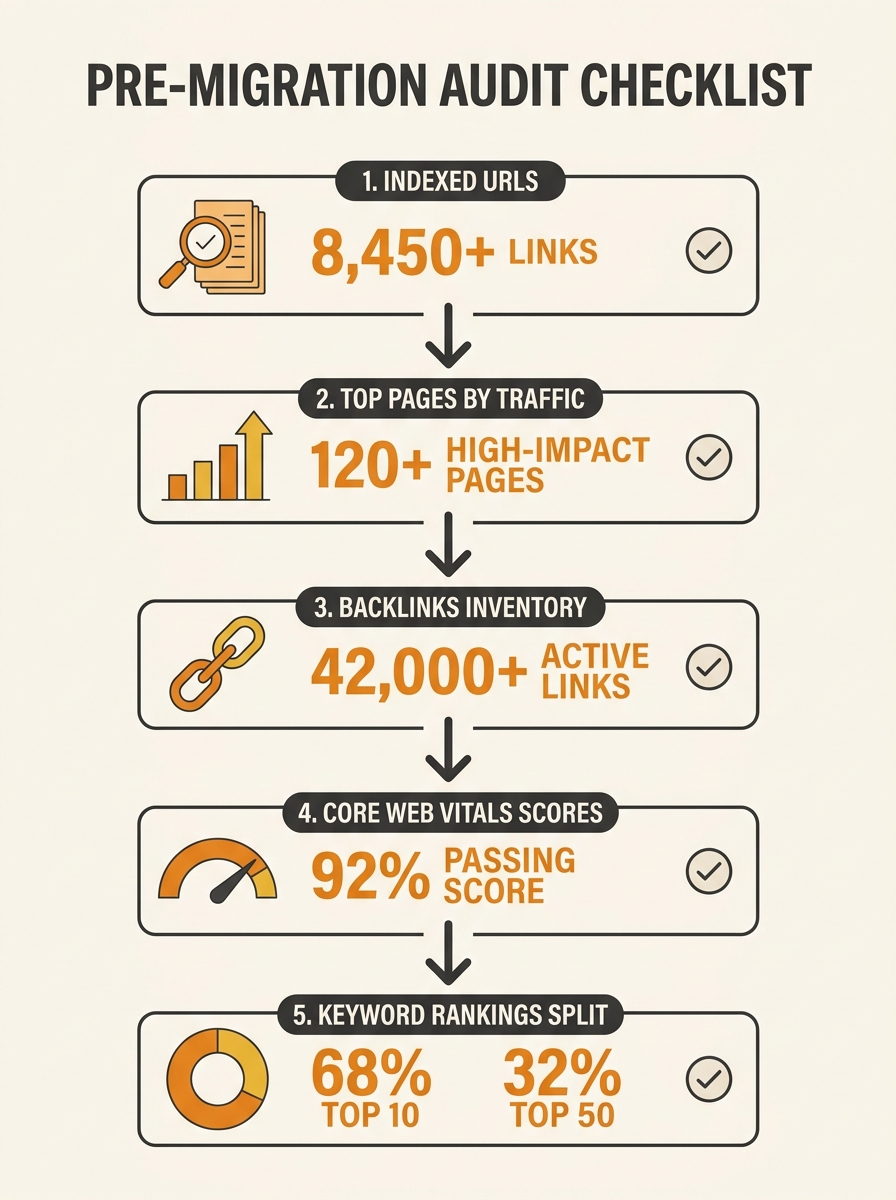
Your baseline audit should capture these specifics:
- Every indexed URL, exported from Google Search Console’s “Pages” report
- The top 50 pages by organic sessions over the past 12 months
- All inbound backlinks and their destination URLs (Ahrefs or Semrush exports work here)
- Current Core Web Vitals scores for your top 20 landing pages
- Keyword rankings split: branded vs. non-branded, with current positions
If your site has structural SEO debt you haven’t addressed, a migration will compound those problems rather than fix them. Identify broken internal links, orphan pages, and crawl errors before the move, not after.
Building the Redirect Map
A 301 redirect is a server-side instruction telling search engines and browsers that a URL has permanently moved. According to Search Engine Journal’s analysis of ranking factors, 301 redirects pass 90–99% of a page’s accumulated link equity to its new URL. A 302 (temporary) redirect passes none of that equity, making it the single most common technical mistake during domain migrations for Australian businesses.
Semrush’s migration guide is direct on this point. According to their website migration checklist, “Permanent ranking drops and lost traffic aren’t always caused by the migration itself. They’re caused by preventable issues like missing redirects and undetected crawl blocks.”
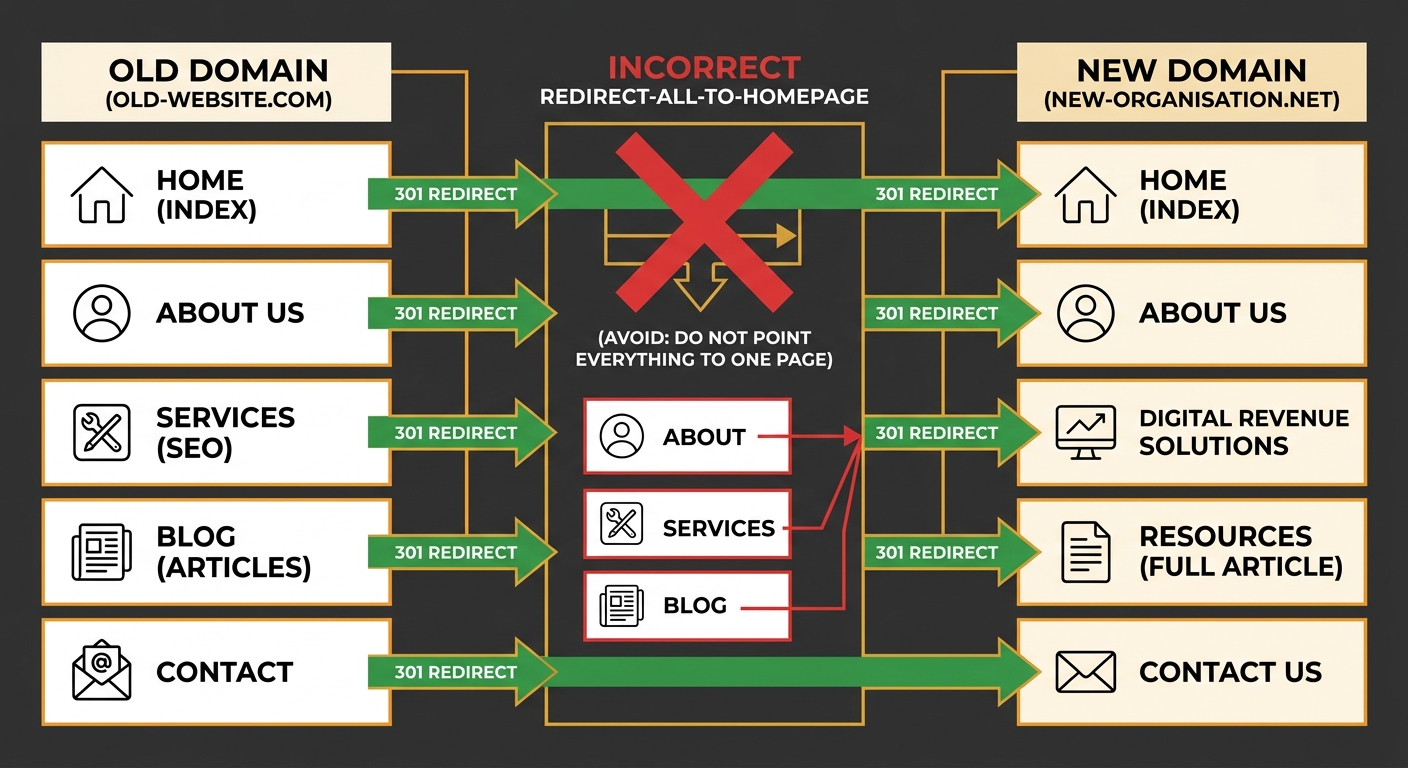
The redirect map itself is a spreadsheet. Column A holds every old URL. Column B holds the corresponding new URL. Every page gets a one-to-one match. Dumping 200 old URLs into a single homepage redirect (a “redirect-all” pattern) tells Google that 200 distinct pieces of content no longer exist, which strips your topical authority across those terms.
For 301 redirects on an Australian business domain, pay special attention to location-specific pages. If you have /melbourne-plumbing-services/ on the old domain, it needs to resolve to an equivalent page on the new domain, not a generic /services/ page. Location pages carry local ranking signals that vanish when you redirect them to mismatched content.
| Redirect scenario | Correct approach | Common mistake |
|---|---|---|
| Old product page → New product page | 1:1 redirect matching content | Redirecting all products to /shop/ |
| Old location page → New location page | Match city/suburb targeting | Redirecting to generic /contact/ |
| Old blog post → New blog post | Preserve URL slug where possible | Letting CMS generate new slugs |
| Deleted page with backlinks | Redirect to most relevant existing page | Letting it 404 |
| Old HTTP URLs | Redirect HTTP → HTTPS on new domain | Only redirecting HTTPS → HTTPS |
Staging, Crawl Blocks, and the Quiet Launch Window
Before your new site goes live, it sits on a staging server. And that staging server needs to be invisible to search engines. Intergrowth’s domain migration checklist warns that an unblocked staging site can start ranking for your target keywords, actively stealing traffic from your live pages before you’ve even migrated.
Block staging from indexation using a robots.txt disallow rule and a noindex meta tag on every page. But if you forget to remove those blocks when you push staging to production, Google can’t crawl your new site at all. We’ve covered how robots.txt and meta robots directives can cancel each other out, and migration day is exactly when those conflicts surface.
Waypoint Digital’s Australian migration guide flags a critical transfer gap that many SMEs miss. According to their SEO website migration guide, “Page titles, meta descriptions, headings, internal links, image alt text. None of this transfers automatically when you switch CMS.” Every piece of on-page SEO has to be manually carried over and verified. Don’t rewrite top-performing pages during the migration. Move them with their existing content intact, then optimise later.
Timing the actual cutover matters more than most businesses realise. The Webflow migration guide recommends launching during a quiet traffic window, noting that “a quiet window gives you space to validate redirects, templates, and analytics before search engines recrawl the full website.” For most Australian SMEs, that means a Saturday evening or Sunday morning AEST, when organic sessions hit their weekly low.
Go-Live Day
The DNS switch takes 24–72 hours to propagate globally, though Australian users on major ISPs typically see the change within 4–12 hours. During this propagation window, some visitors will hit the old site and others will reach the new one. This is normal and temporary.
Your first 60 minutes after flipping DNS should follow this sequence:
- Verify the homepage loads correctly on the new domain
- Test 10–15 of your highest-traffic redirects manually (type the old URL, confirm it resolves to the correct new page)
- Check that your XML sitemap at the new domain is accessible and lists only new URLs
- Submit the new sitemap in Google Search Console
- Verify canonical tags are pointing to the new domain, not the old one
- Confirm Google Analytics and any conversion tracking scripts are firing on the new domain
Warning: If your staging noindex tags are still active on production, Google Search Console will show zero indexed pages within 48 hours. Check the “Pages” report on day 2 to confirm indexation is progressing.
Within the first 24 hours, run a full-site crawl using Screaming Frog or Sitebulb. You’re looking for three things: pages returning 404 errors (missed redirects), pages with the old domain in their canonical tags, and any remaining noindex directives from staging. A site with 500 pages will typically surface 15–30 redirect gaps on the first crawl, even with careful mapping.
The First 12 Weeks of Recovery
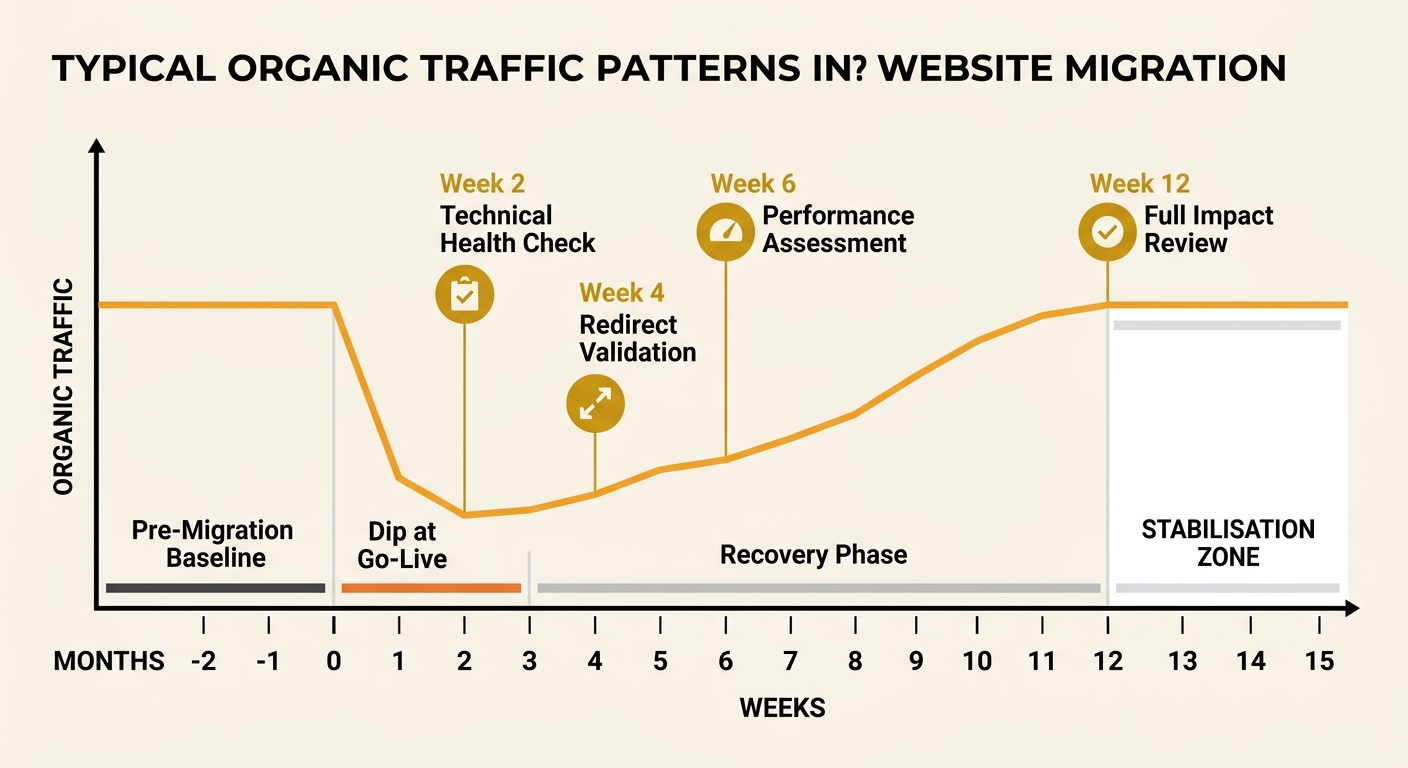
Website migration SEO professionals will tell you the same thing across the board: rankings fluctuate for 4–12 weeks after a domain move, with full recovery in competitive niches taking 3–6 months. Sites with thorough preparation recover 40% faster and hold within 5% of their pre-migration traffic. Poorly planned migrations see 20–40% ranking volatility that can persist well beyond the 6-month mark.
Rankings fluctuate for 4–12 weeks after a domain move, with full recovery in competitive niches taking 3–6 months.
Week-by-week monitoring should track these metrics:
- Weeks 1–2: Check Google Search Console daily for crawl errors, indexation status, and any manual actions. Crawl rates will spike as Googlebot discovers and processes your redirects.
- Weeks 3–4: Compare organic traffic to pre-migration baselines. If traffic is down more than 15%, audit your redirect map for gaps, focusing on your top 20 landing pages.
- Weeks 5–8: Keyword positions should begin stabilising. Pages that haven’t recovered by week 6 typically have a redirect, canonical, or content-matching problem.
- Weeks 9–12: Traffic should sit within 5–10% of pre-migration levels for well-executed moves. If branded search traffic recovered but non-branded hasn’t, you’ve likely lost topical authority signals that need rebuilding through content and link acquisition.
Any Australian SME pursuing digital marketing for small business goals needs to factor this recovery timeline into campaign planning. Don’t launch a paid media push or new content campaign during weeks 1–4 of a migration. Let the domain settle first.
Where the Numbers Settle
The data across migration case studies is consistent. Businesses that preserve search rankings through migration share three common traits: they built one-to-one redirect maps covering 100% of indexed URLs, they documented pre-migration performance baselines, and they monitored daily for the first 30 days post-launch.
The businesses that lost rankings permanently share a different pattern: they used redirect-all shortcuts, they changed URL structures and page content simultaneously, or they left staging crawl blocks active on production.
A domain migration checklist is a risk-management document. The goal is to arrive on the new domain with the same organic visibility you had on the old one. Growth comes after, once the technical SEO migration is confirmed stable and you can turn your attention to content expansion and fixing the on-page elements that matter beyond valid HTML.
Keep your old domain active and serving redirects for a minimum of 12 months. Google’s documentation has historically recommended keeping redirects in place “as long as possible,” and dropping them before the 12-month mark risks losing link equity that hasn’t fully transferred. For Australian businesses where the .com.au domain carries brand recognition, maintaining the redirect indefinitely costs almost nothing (annual renewal plus basic hosting) and eliminates a long-tail risk that no amount of subsequent SEO work can recover.