

Cross-industry audit data puts the SEO failure rate for website migrations at nine in ten. Australian businesses changing domains, replatforming to Shopify or WordPress, or restructuring URLs face a typical 30-50% immediate traffic loss. Recovery takes three to six months when handled correctly, and far longer when the damage goes unaddressed.
The Redesign Brief That Left SEO Out
The timeline of a failed website migration almost always starts the same way: a business owner signs off on a redesign with a developer or agency, and nobody involves an SEO specialist until after launch. Waypoint Digital’s migration guide for Australian business owners spells out the access requirements an SEO specialist needs before work begins: admin access to the current CMS for crawling and benchmarking, admin access to the staging environment, and Google Search Console verification on both old and new properties.
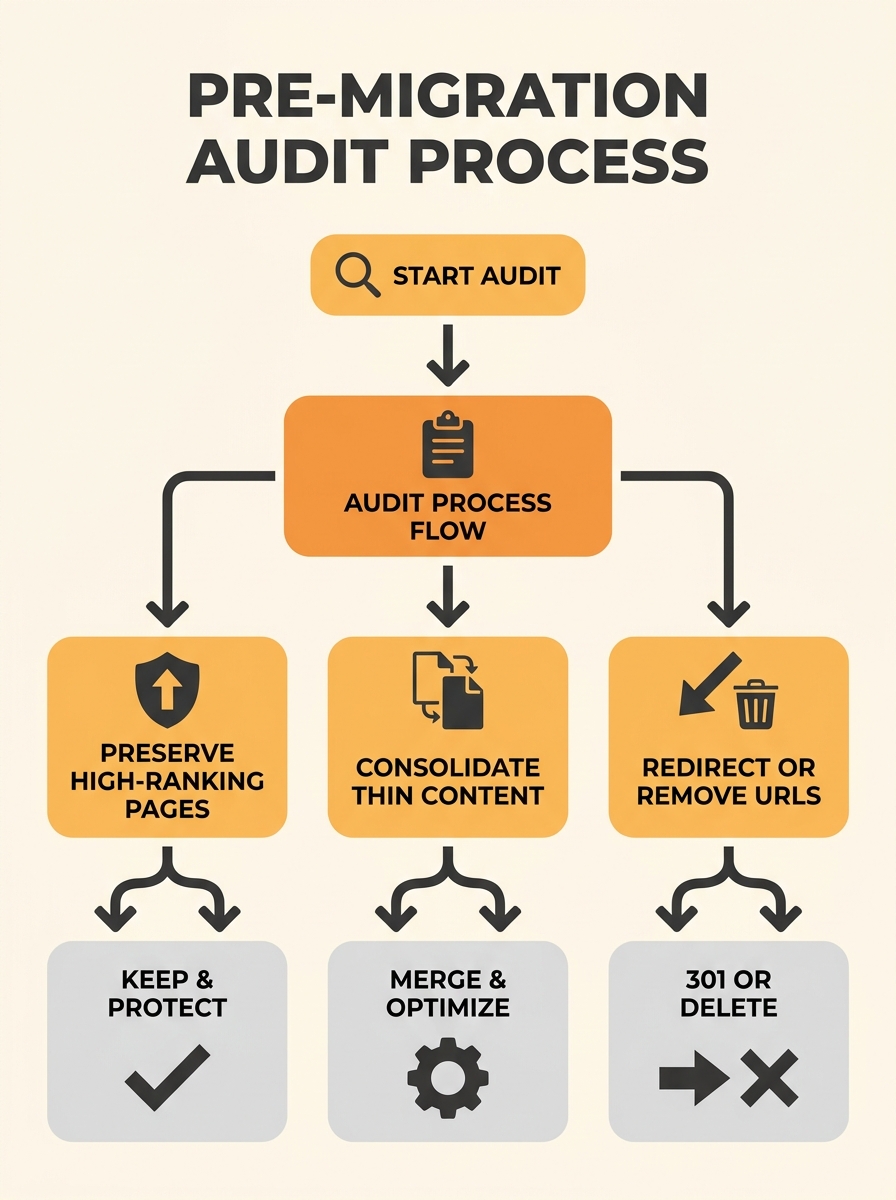
When SEO gets excluded from the brief, three things go unrecorded: which URLs currently rank and for what terms, which pages carry the strongest backlink profiles, and which images generate their own organic traffic. A site with 200 indexed pages might have 15-20 URLs driving 80% of its organic sessions. Those 15-20 pages need individual attention during migration. The remaining 180 still need correct redirects, but the high-value pages determine whether the business keeps its revenue or watches it disappear.
Semrush’s migration checklist recommends using their Organic Research tool to identify underperforming pages before launch, deciding whether to improve, consolidate, or delete low-value content. This pre-migration audit step is where Australian businesses can separate pages worth preserving from dead weight.
Launch Day: When the Redirects Break
The new site goes live. The old URLs stop resolving. And for the vast majority of migrations that fail, this is the moment where damage begins.
The single largest technical failure is redirect mapping. Every old URL needs a 301 redirect pointing to its specific equivalent on the new site. A 301 tells Google to permanently transfer ranking signals (link equity, crawl history, indexation trust) from the old address to the new one. When done correctly, Google processes these within days. When done incorrectly, the damage compounds hourly.
The most common redirect mistake Australian businesses make is the wildcard homepage redirect: every old URL points to the new homepage. Google treats these as soft 404 errors, which means the search engine acknowledges the redirect exists but refuses to transfer ranking value. A site with 200 old URLs all pointing to the homepage has effectively told Google that 200 pages no longer exist. Rankings for every one of those pages drop out of the index.
A second failure pattern involves redirect chains. An old URL redirects to an intermediate URL, which redirects again to the final destination. Google follows up to 5 hops in a redirect chain before abandoning the crawl, but each hop bleeds link equity. A direct old-to-new 301 preserves roughly 90-99% of link value. A three-hop chain can lose 15-30%.
Warning: If your developer has set up redirects using client-side JavaScript (meta refresh tags or window.location), Google may not follow them at all. Server-side 301 redirects configured in Apache, Nginx, or your hosting platform’s redirect manager are the only reliable method for passing SEO value during an Australian business domain migration.
The First 72 Hours of Silence
A botched migration looks fine at first because Google doesn’t re-crawl an entire site in minutes. The old cached versions of your pages persist in search results for 24-72 hours after launch. Traffic appears stable. Rankings hold. The business owner assumes the migration worked.
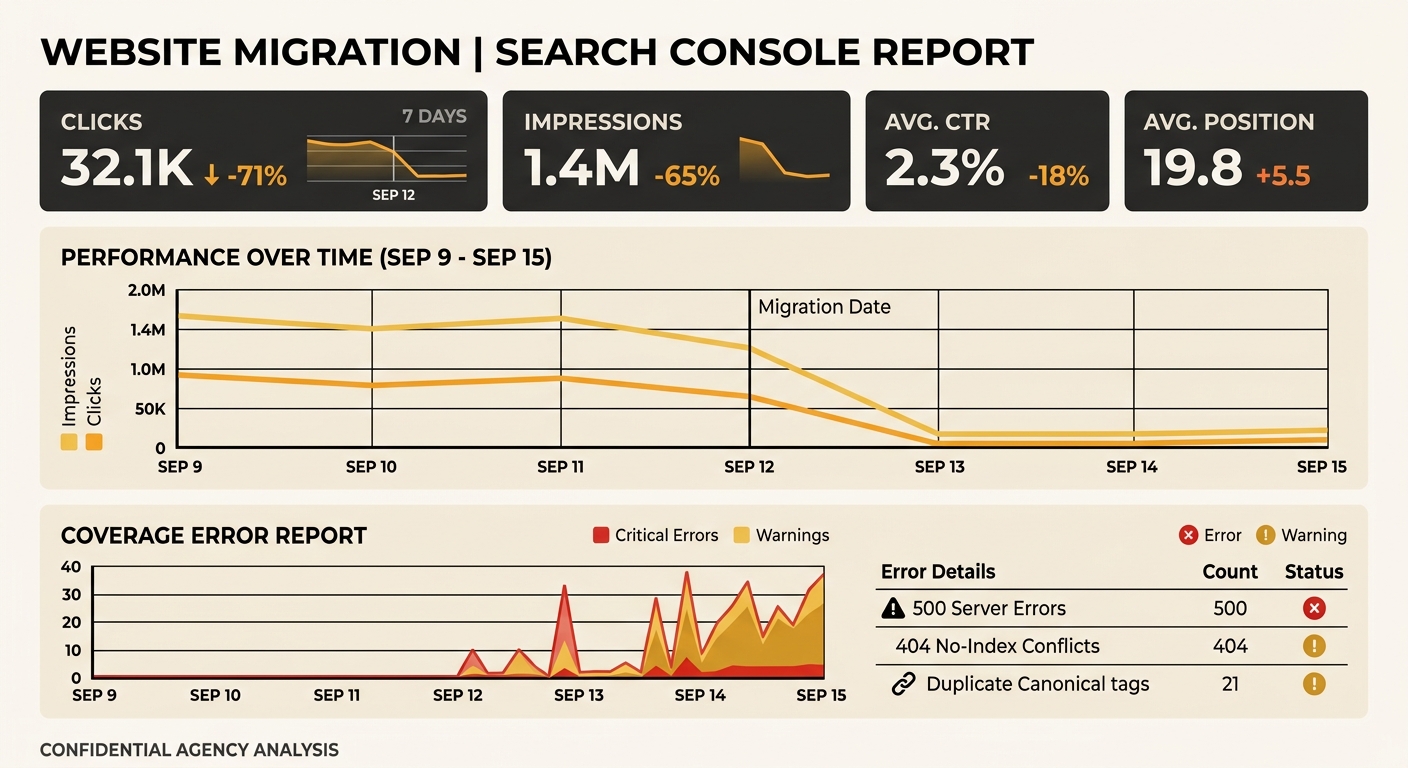
Then Google’s crawler arrives at the old URLs, follows the redirects (or hits 404 errors where redirects are missing), and begins reassessing. Within 48-72 hours, pages start disappearing from search results. By day 5, the damage shows in Google Search Console’s Performance report: impressions drop, clicks fall, and the Coverage report starts flagging errors.
Search Console shows new “Crawled — currently not indexed” entries, “Page with redirect” notices, and if redirects are missing entirely, “Not found (404)” errors stacking up. We’ve covered how pages move into “Not Indexed” status and the patterns behind these signals. They’re relevant reading if you’re mid-crisis right now.
Weeks Two Through Four: The Full Damage Report
By the second week, the full scope becomes clear. A typical poorly-migrated Australian business site shows these symptoms:
- 40-60% drop in organic sessions compared to the pre-migration baseline
- Dozens or hundreds of 404 errors where old URLs had no redirect mapped
- Orphaned pages on the new site that exist but have no internal links pointing to them
- Missing structured data where schema markup from the old site wasn’t carried across, killing rich result eligibility
- Broken canonical tags pointing to old URLs that no longer resolve
That structured data loss deserves attention on its own. If the old site had LocalBusiness, Product, or FAQPage schema generating rich snippets, those snippets vanish the moment the markup disappears. We’ve written about which schema types actually matter for Australian SMEs and the implementation priority order. If your migration dropped this markup, that guide covers the rebuild.
Content parity failures compound the problem. The215Guys documented a case where missing service pages and blog posts caused a sustained rankings drop, with the team noting that “recovery took about three months” once the content was restored and indexed. Pages that ranked before the migration need to exist after it, with the same content depth and keyword targeting. A redesign that cuts 40 blog posts to “clean things up” is cutting 40 ranking assets.
A redesign that cuts 40 blog posts to “clean things up” is cutting 40 ranking assets.
Month Two: The Recovery Work
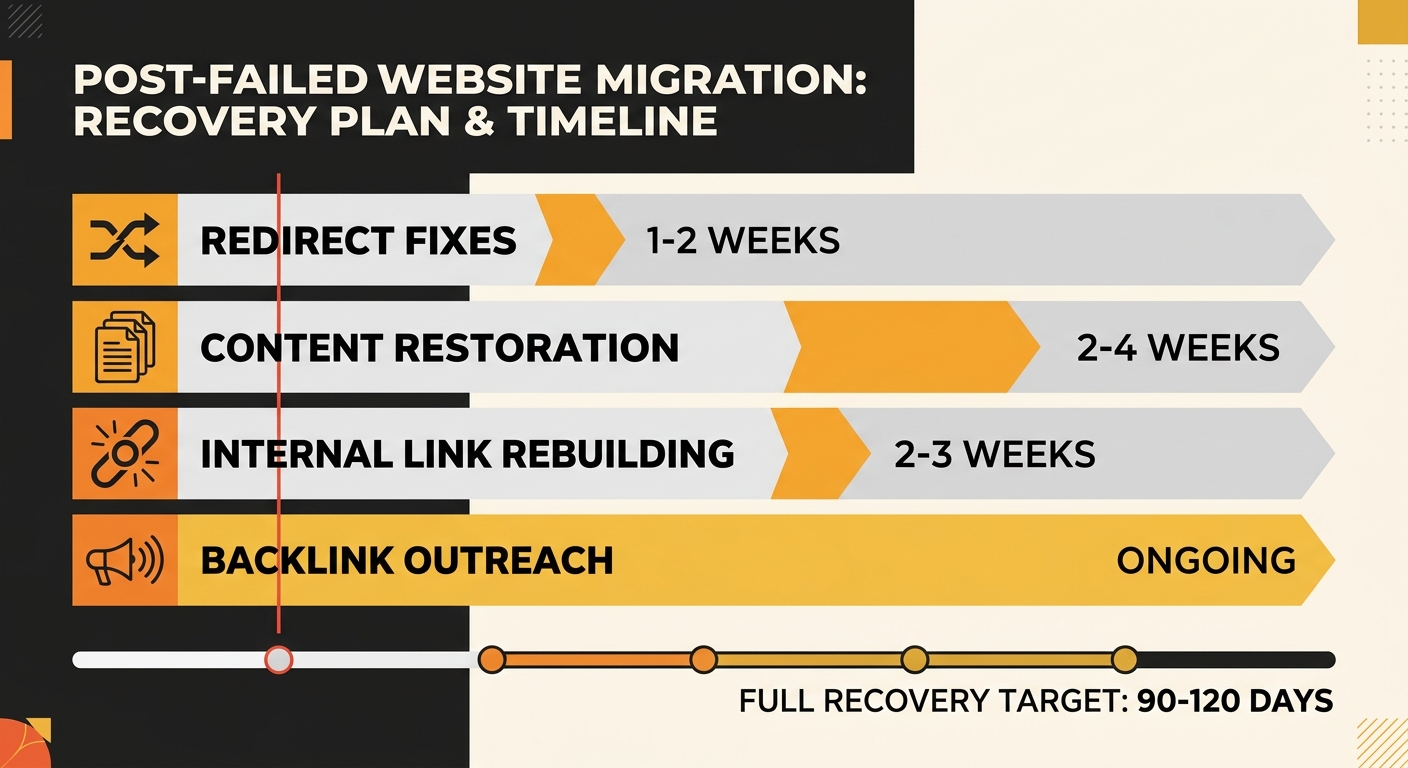
Post-migration ranking recovery follows a predictable sequence. The website migration SEO recovery work breaks into four parallel tracks:
Track 1: 301 redirect audits. Export the full list of old URLs from a pre-migration crawl (Screaming Frog, Sitebulb, or a similar crawler) and verify each one returns a 301 status pointing to the correct new page. Any URL returning a 404, a 302 (temporary redirect), or a redirect chain needs immediate correction. For 301 redirect audits in Australia, this is the single highest-impact recovery action available.
Track 2: Content restoration. If pages were removed during migration, they need to come back. Use the Wayback Machine to recover content if the original files are lost. The URL can be new, but the content depth and keyword targeting should match what ranked before.
Track 3: Internal link rebuilding. The new site’s navigation and content links need to create clear paths between related pages. A site architecture audit identifies orphaned pages with zero or minimal internal links. These pages won’t get crawled efficiently regardless of their content quality.
Track 4: Backlink outreach. ThatWare’s recovery timeline research recommends “proactively reaching out to update backlinks, especially from authoritative domains,” stating this approach “can significantly speed up recovery and restore lost trust signals faster.” While 301 redirects pass most link equity, a direct backlink to the live URL passes full value without any intermediary.
Month Three and Beyond: When Rankings Return
The post-migration ranking recovery timeline depends on the severity of the initial damage. Well-executed recovery work, with all four tracks running simultaneously, typically shows measurable improvement within 30 days of fixes being implemented. Full recovery to pre-migration traffic levels takes 90-120 days for sites that catch the problem early and act within the first two weeks.
Sites that wait longer face extended timelines. A business that doesn’t begin recovery until month three post-migration can expect 6-12 months before organic traffic stabilises, because Google has already processed the missing pages and 404 errors as intentional removals. Recovering from that signal takes repeated crawling, fresh indexation requests, and sustained content publishing to rebuild trust.
Google Search Console remains the primary monitoring tool throughout. Track these metrics weekly: total indexed pages (which should trend upward toward pre-migration levels), total impressions (the leading indicator of ranking recovery), and the count of pages sitting in “Discovered — currently not indexed” status (which should trend downward as Google processes fixed redirects). If you’re also dealing with canonical tag conflicts between old and new URL structures, those need resolution before indexation stabilises.
The State of Play
Australian businesses continue to lose rankings during website migrations at a rate that’s disproportionate to the difficulty of preventing it. The technical requirements are well-documented: map every URL before launch, implement server-side 301 redirects for each one, maintain content parity, preserve structured data, and monitor Search Console daily for the first 30 days.
The pattern repeats because migration planning still treats SEO as an afterthought, something to verify after the new design launches rather than a constraint that shapes the project from its first week. An SEO specialist working through the migration checklist before development starts costs a fraction of what post-migration recovery ends up billing. The businesses that lose 30-50% of their organic traffic aren’t unlucky. They skipped a planning step that takes two to three days and costs less than a single month’s paid search spend would to replace the lost revenue.