

Crawl budget waste on Australian sites with more than 10,000 URLs follows predictable patterns. Parameter duplicates, orphaned pages, and soft 404s account for up to 80% of Googlebot’s requests in typical audits run by Australian SEO agencies, according to findings from Perceptiv Media. Mapping where those wasted crawls concentrate tells you exactly where to intervene.
The Three Zones of Crawl Efficiency
Every URL on your site falls into one of three categories when a search engine crawler visits: productive, redundant, or dead-end. Productive crawls hit pages you want indexed, pages that serve real search intent and carry commercial or informational value. Redundant crawls hit parameter variations, tracking-code URLs, sorting pages, and other near-duplicates that resolve to the same canonical. Dead-end crawls land on soft 404s, expired content still in your sitemap, empty taxonomy pages, and orphaned URLs that lead nowhere useful.
Google’s official crawl budget documentation, updated December 19, 2025, defines crawl budget as the intersection of crawl capacity (what Googlebot can fetch without degrading your server performance) and crawl demand (what Google perceives as worth fetching based on freshness, popularity, and inventory size). When redundant and dead-end URLs dominate your crawl logs, you’re burning capacity on pages Google doesn’t want and shouldn’t need. The demand signal for your genuinely valuable pages gets diluted across thousands of junk requests, and new content takes longer to appear in search results.
A 2026 e-commerce case study documented what happens when you address this directly: blocking filter, search, and admin URLs in robots.txt and removing 12,000 out-of-stock product pages from the sitemap produced a 73% reduction in crawl waste. The result was faster indexing of new products and a 733% ROI within 90 days. Those numbers belong to a large retailer, but the principle scales down to any Australian business site where URL proliferation has gone unchecked — particularly e-commerce stores, directory-style service sites, and WordPress installations with years of accumulated taxonomy debris.
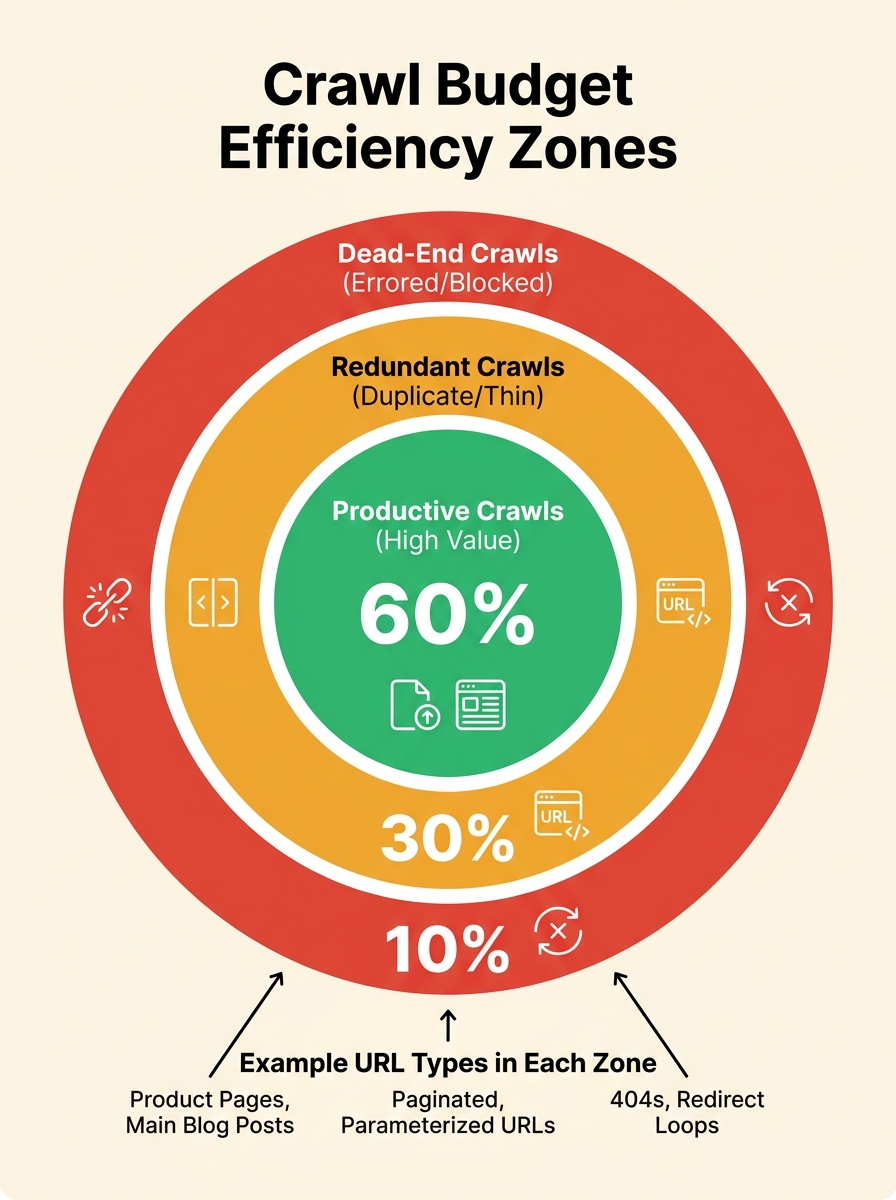
Understanding how your technical SEO site structure shapes crawler behaviour is the first step toward diagnosing which zone is eating most of your budget. The Crawl Budget Efficiency Map framework works by classifying every crawled URL into one of these three zones, then measuring the ratio. A healthy site puts 70% or more of its crawl requests into the productive zone. If your ratio sits below 50%, the crawler is spending more time on waste than on content that can actually rank.
Why Orphaned Pages Drain Crawl Demand Without Warning
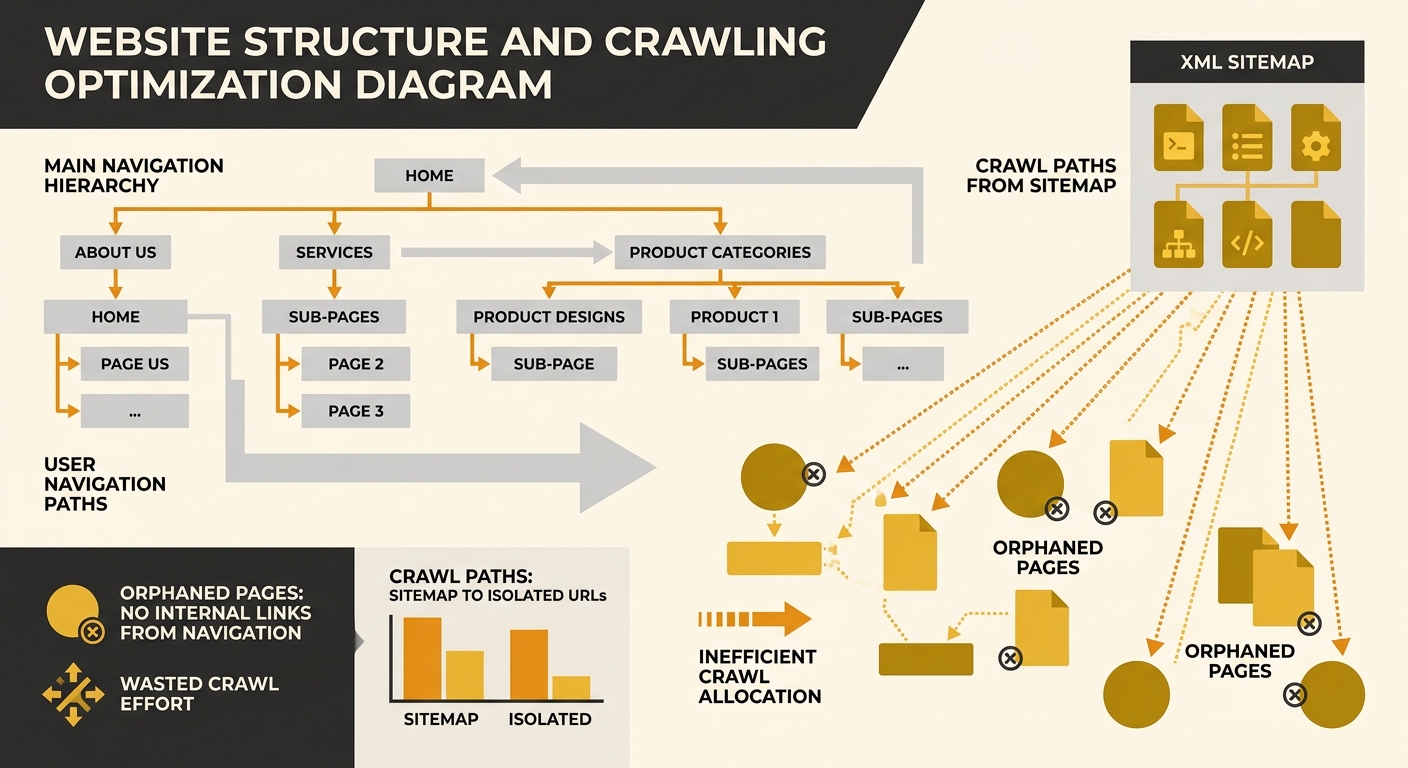
Orphaned pages are URLs that exist on your server and appear in your XML sitemap but have zero internal links pointing to them. They’re discoverable by crawlers through the sitemap, but they carry none of the internal link equity that signals importance. According to Botify’s research on orphan pages, these URLs typically rank poorly in SERPs and generate minimal organic traffic, yet they consume crawl requests every time Googlebot processes your sitemap.
The orphaned pages diagnosis problem is acute on WordPress sites. The platform’s flexible taxonomy system generates category and tag archive pages automatically, and when categories contain no posts or tags are created but never applied to content, those empty pages become orphans by default. A WordPress site with 200 unused tags has 200 orphaned URLs sitting in its sitemap, each one requesting a share of crawl attention that could go to a service page or blog post with genuine search value. Digital Thrive’s guide on fixing orphan pages notes that resolving orphans improves crawl frequency for properly linked pages while reducing wasted crawl requests to near zero for the affected URLs.
For Australian businesses running location-based service pages, the orphan problem compounds. You might have 15 suburb-specific landing pages that were created during a site migration but never linked from the main navigation, the footer, or any internal content. Googlebot finds them through the sitemap, crawls them, determines they have thin internal support, and deprioritises them. Meanwhile, your crawl budget has 15 fewer requests available for the pages that are actually converting visitors. If you’ve already run an internal link audit to surface orphaned pages and broken link chains, you’ll recognise this pattern. The fix involves either integrating orphans into your internal linking structure or removing them entirely through 410 status codes rather than noindex directives — because Google’s own documentation warns that noindex still requires a crawl request to process, meaning it doesn’t save budget.
Log File Analysis Turns Assumptions into Data
Search engine crawling efficiency looks different in theory than in practice, and the gap between the two usually surprises site owners. Google Search Console’s crawl stats report gives you aggregate data — total requests, average response time, crawl status breakdowns — but it doesn’t tell you which specific URLs are consuming the most crawl budget or how often Googlebot returns to pages that haven’t changed. Server log files do. Every time Googlebot (or any crawler) requests a URL, your server records the IP address, the URL fetched, the response code, the user agent string, and the timestamp. That raw data, when parsed and segmented, becomes the diagnostic layer the Efficiency Map depends on.
Australian SEO practitioners increasingly treat log file analysis as the dividing line between guessing and knowing. Perceptiv Media’s approach combines server logs with Google Search Console data and Screaming Frog crawl exports to build a complete picture of bot behaviour across a site. The method reveals specifics that no other tool surface: that Googlebot hit your /wp-admin/ directory 340 times this month despite robots.txt disallows, that 2,100 crawl requests went to parameter URLs generated by your faceted navigation, that your newest blog posts took 14 days to receive their first crawl while outdated category archives got visited daily. Tools like seoClarity’s Bot Clarity module, which integrates log file analysis directly into the SEO platform, automate much of this segmentation, but even a manual review of raw logs filtered by Googlebot’s user agent string delivers actionable findings within hours.
If your crawl ratio sits below 50% productive, the crawler is spending more time on waste than on content that can actually rank.
Server response time matters here too. Googlebot’s crawl rate is directly tied to how fast your server responds; the recommended target sits under 500 milliseconds per request. One Australian firm documented improved crawl throughput by isolating Googlebot traffic to a dedicated server pool, pre-caching pages based on observed crawl patterns, and maintaining render speeds below 100 milliseconds consistently. When your server is slow, Google throttles its crawl rate to avoid overloading you, which means the crawl budget you do have gets consumed even more slowly. A site with 50,000 URLs and a 1,200-millisecond average response time will take substantially longer to get its full inventory crawled than a competitor with the same page count responding in 300 milliseconds. Making sure your robots.txt and meta tags aren’t creating conflicting signals during this process avoids a common trap where you fix server speed but still block the pages you want crawled.
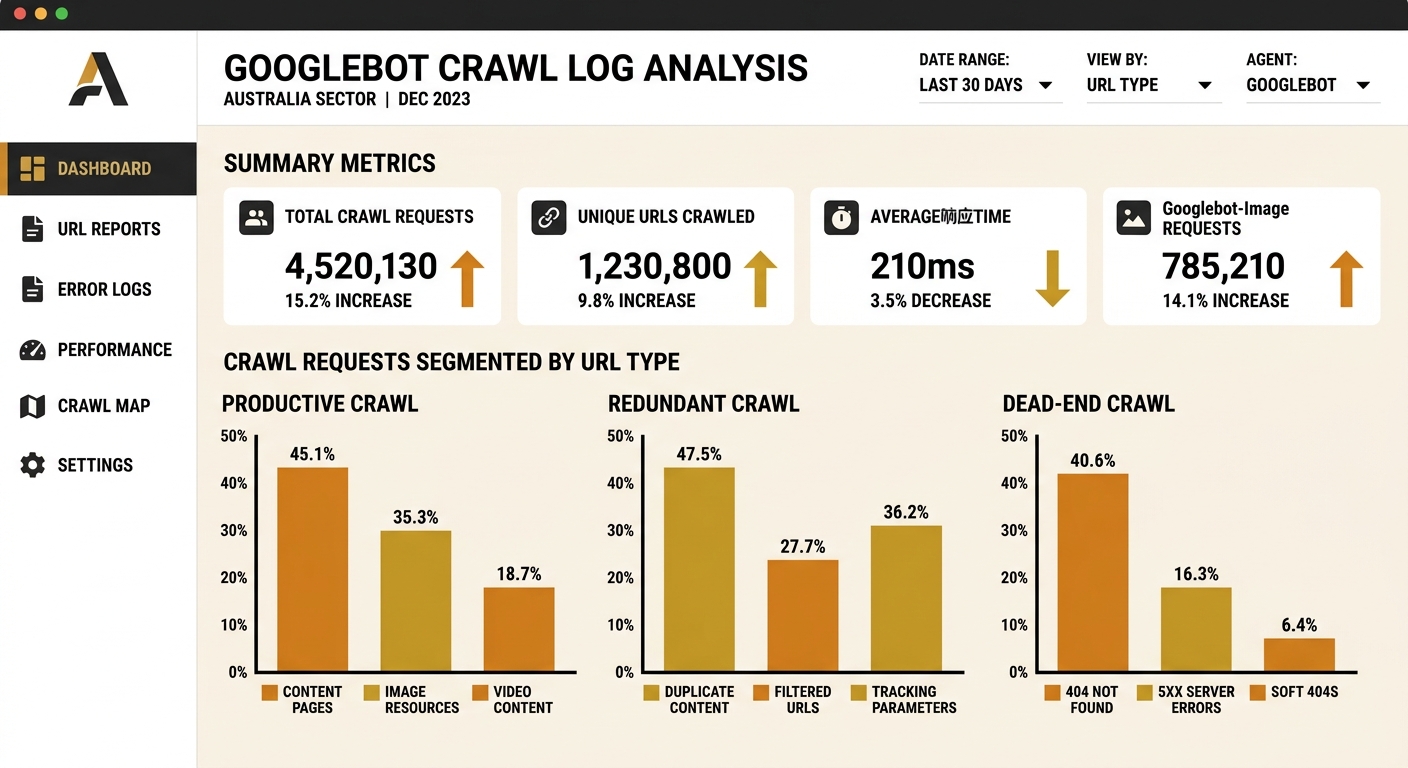
For businesses managing local SEO services alongside their broader organic strategy, the log file data often reveals a secondary problem: AI search bots like GPTBot, ClaudeBot, and PerplexityBot consuming server resources alongside Googlebot. Search Engine Land’s analysis of AI bot optimisation confirms that understanding bot behaviour through log files has become strategic for visibility in both traditional and AI search results. Your robots.txt might be wide open to these crawlers, meaning they’re indexing the same redundant and dead-end URLs that waste Google’s time — and potentially surfacing low-quality pages in AI-generated summaries.
Where the Efficiency Map Gets Uncertain
The Crawl Budget Efficiency Map gives you a clear diagnostic framework: classify URLs into productive, redundant, and dead-end zones, measure the ratio, and fix the worst offenders first. But the map has edges where the terrain gets harder to read, and pretending otherwise would be dishonest. For sites with fewer than 10,000 pages, Google’s own guidance suggests crawl budget is rarely a meaningful constraint, and the time spent optimising it could be better directed at content quality, triaging your broader list of technical SEO issues, or strengthening internal linking. The framework works best for mid-to-large sites where URL proliferation has genuinely outpaced the crawler’s willingness to visit everything.
There’s also the attribution problem. You can prove that fixing orphaned pages and cleaning your sitemap reduced wasted crawl requests. You can demonstrate that server response times improved and crawl frequency increased for priority URLs. What’s harder to prove is the direct revenue impact, because crawl efficiency sits several steps upstream of rankings, which sit upstream of clicks, which sit upstream of conversions. The 733% ROI figure from the e-commerce case study is compelling but specific to a site where new product indexing speed had a direct line to sales. For a services business in Brisbane or Perth, the causal chain between crawl budget optimisation in Australia and revenue is longer and messier, with more confounding variables along the way.
And the landscape itself keeps shifting. Google allocates crawl budget per hostname, meaning your www subdomain and your shop subdomain operate on separate budgets. A site migration that consolidates subdomains changes your crawl dynamics entirely. AI crawlers add unpredictable load. CMS updates generate new URL patterns. The efficiency map you build today will drift out of accuracy within months if you don’t re-run the log file analysis periodically. The diagnostic value of this framework comes from treating it as a recurring practice rather than a one-time audit — which, honestly, is the part most businesses struggle to commit to.