

Replatforming an ecommerce site without a dedicated SEO specialist demands 10 technical steps in strict sequence, from baseline URL auditing through 301 redirect mapping to 90 days of post-launch monitoring. Skip any single step and the 30–50% organic traffic collapse that migration case studies consistently document becomes near-certain.
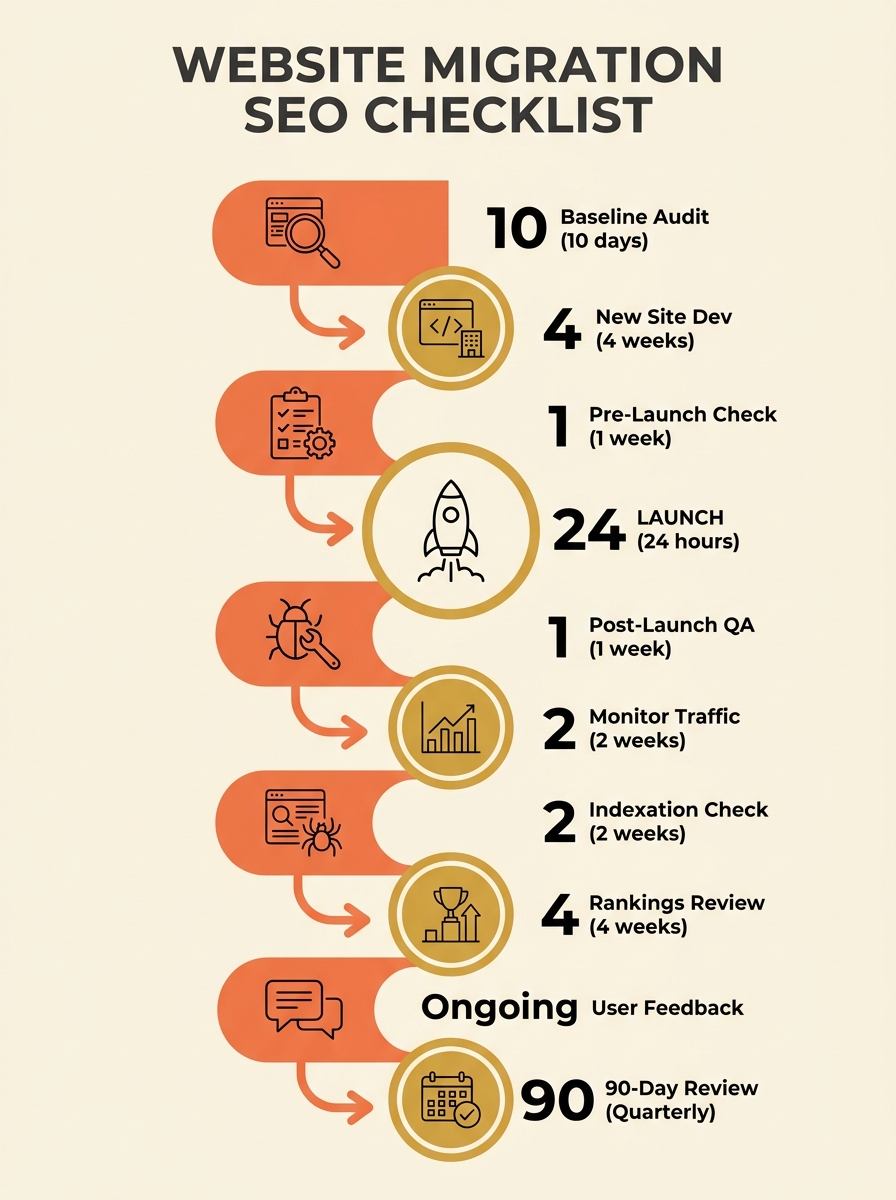
Weeks Six Through Four Before Launch: The Baseline Audit
Why start six weeks out? Because domain migration technical SEO work requires a clean snapshot of your existing site before anyone touches code or DNS records. Semrush’s website migration checklist prescribes setting goals, conducting a risk assessment, and establishing baseline analytics before changing anything. For ecommerce stores, this audit is especially dense because product catalogues generate hundreds or thousands of indexable URLs that each carry their own ranking history.
Run a full crawl of your current site with Screaming Frog or Sitebulb. Export every URL, its HTTP status code, canonical tag, title tag, meta description, word count, and inbound link count. For a typical Australian online retailer with 500–2,000 product pages, this crawl generates a spreadsheet that becomes the single source of truth for the entire migration. Record your Google Search Console data: total indexed pages, average click-through rate, top 50 queries by impressions, and any existing coverage errors. Screenshot your GA4 landing page report filtered to organic traffic for the trailing 90 days.
Waypoint Digital’s Australian business owner’s migration guide stresses that “switching content management systems can cause your site’s search ranking to dip” regardless of the platform you move to, and that documenting pre-migration performance is the only way to measure whether the migration succeeded or failed.
Your baseline audit also includes external backlinks. Export your link profile from Ahrefs or Search Console. Every domain linking to your old URLs needs its equity preserved through redirects. For stores with 200+ referring domains, this step alone takes 3–4 hours.
Building the URL Map and Redirect Plan
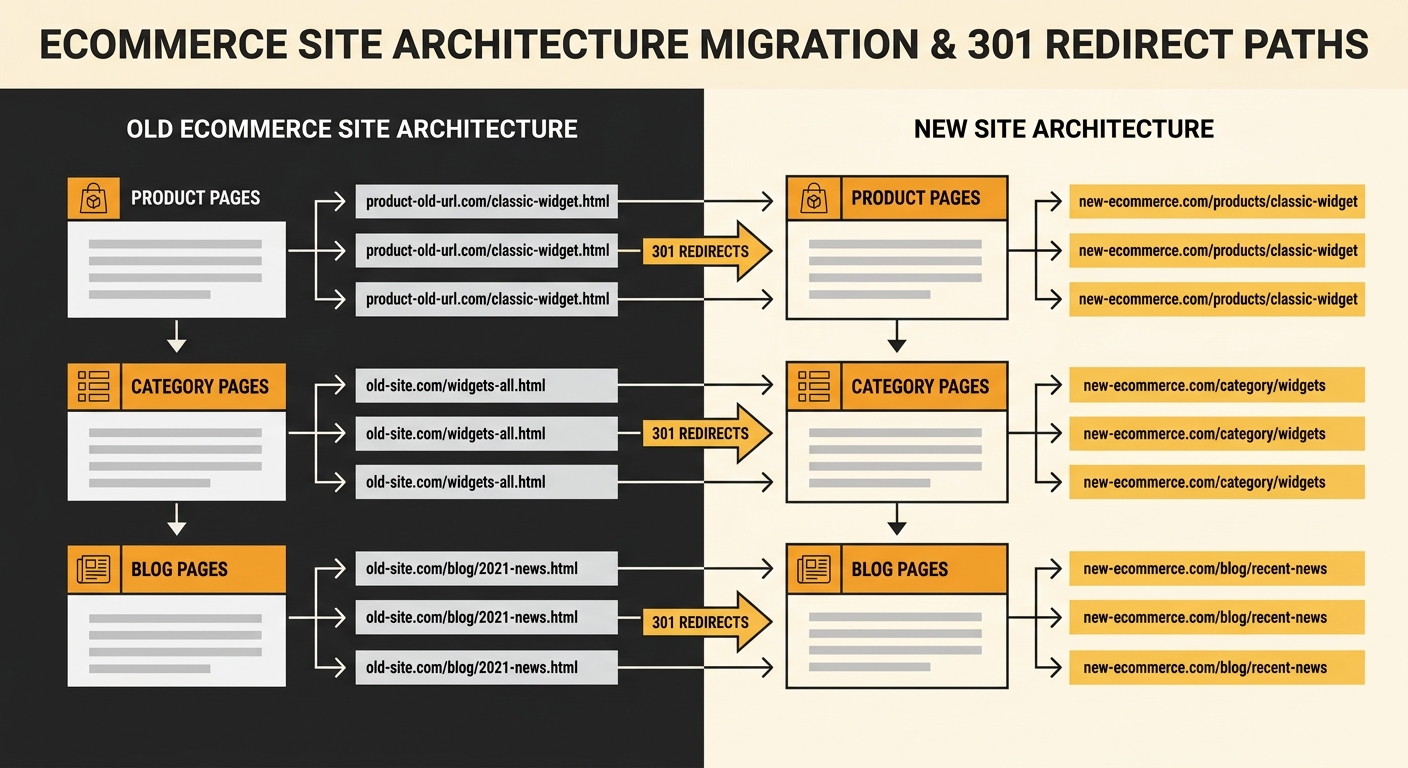
The redirect map is where preserving SEO authority during site migration either works or falls apart. Open a spreadsheet with two columns: old URL and new URL. Every single page from your crawl export needs a destination. For ecommerce sites, this means mapping individual product pages, category pages, filtered URLs, blog posts, policy pages, and image assets.
According to Search Engine Land’s migration guide, you should monitor your redirect mapping against the benchmark data recorded in your pre-migration audit document throughout the process. Prioritise your top 100 pages by organic traffic first, then work through the long tail. A store generating 60% of its revenue from 40 product pages needs those 40 redirects tested individually before anything else.
Your 301 redirect strategy for Australian businesses should follow three rules. First, use 301 (permanent) redirects exclusively for pages that have moved to new URLs, as Wadi Digital’s migration guide confirms that 301 redirects are required for all permanent URL changes. Second, avoid redirect chains where URL A redirects to URL B which redirects to URL C. Google’s John Mueller has stated that while Googlebot can follow chains, each hop leaks a small amount of PageRank, and chains of 3+ hops risk being dropped entirely. Third, keep the old domain and its redirects live for a minimum of 12 months. Community consensus on Reddit’s r/SEO forum supports keeping the website on the old domain running until redirects have been fully validated by Google’s indexing.
If you’ve previously dealt with how conflicting canonical tags confuse Google’s crawlers, you’ll recognise a similar risk here: contradictory signals between old URLs, new URLs, and canonical declarations can fragment your crawl budget overnight.
The Staging Environment Goes Live
Build the new site on a staging subdomain (staging.yourdomain.com.au) that mirrors your production server’s infrastructure: same PHP version, same memory allocation, same SSL configuration. Iovista’s 2026 migration checklist specifies locking down staging sites from search engine crawling, planning XML sitemaps, migrating structured data, enforcing HTTPS, confirming mobile-first readiness, and validating canonicals.
For ecommerce platforms specifically, staging must replicate your checkout flow, payment gateway connections, and inventory sync. A Shopify-to-WooCommerce migration involves translating product variants, customer accounts, and order history. A Magento-to-Shopify move requires mapping custom attributes to Shopify’s metafield structure. Each of these architectural differences creates potential for migration crawl errors when Google encounters pages that return 404s, 500s, or unexpected content types.
Block the staging environment with a robots.txt disallow and a noindex meta tag. Double-blocking prevents accidental indexing. Test every 301 redirect from your map against the staging URLs. An automated tool like Screaming Frog’s list mode can validate 2,000+ redirects in under 15 minutes, flagging broken destinations, chains, and loops.
Pre-Launch Testing Against Your Baseline
This phase compresses into 5–7 days and catches the errors that cause post-launch disasters. Run a full crawl of the staging site and compare it against your baseline export. Check for title tag mismatches (target under 60 characters), missing meta descriptions (aim for 150–160 characters), orphaned pages with zero internal links, and broken canonical tags.
Validate structured data migration with Google’s Rich Results Test. Ecommerce sites rely on Product, BreadcrumbList, and LocalBusiness schema for rich snippets. A migration that strips this markup loses your star ratings, price displays, and availability badges from search results. If you’re an Australian SME that’s already invested time in getting schema markup right, losing it during migration would undo months of work.
Test Core Web Vitals on the staging environment using PageSpeed Insights. Adchitects’ migration guide specifies implementing critical CSS and JavaScript loading strategies, configuring image compression with lazy loading, and meeting Core Web Vitals thresholds. For ecommerce, Largest Contentful Paint under 2.5 seconds and Cumulative Layout Shift under 0.1 are the targets that directly affect conversion rates. Australian ecommerce sites averaging 3.2 seconds LCP on mobile see 12–15% higher bounce rates than those under the 2.5-second threshold, based on aggregate CrUX data.
Confirm GA4 tracking, Google Tag Manager containers, and conversion events fire correctly on staging. Losing ecommerce tracking during migration means flying blind on revenue attribution for weeks.
Cutover Day and DNS Management
Schedule the cutover during your lowest-traffic window. For most Australian B2C ecommerce stores, that’s Tuesday or Wednesday between 2am and 5am AEST. Lower your DNS TTL (time to live) to 300 seconds at least 48 hours before migration. This means DNS changes propagate across Australian ISPs within 5 minutes instead of the default 24–48 hours.
The cutover sequence runs in this order: deploy the production site, activate all 301 redirects on the old domain, update DNS A records to point to the new server, submit the updated XML sitemap to Google Search Console, and request indexing for your top 20 pages. Keep the old server running with its redirects active. Do not shut it down.
If your store targets multiple Australian locations, this is also the moment to confirm your site architecture supports Google’s AI search indexing requirements for the new URL structure.
Warning: Have a rollback plan documented before you start. If the new site throws 500 errors or payment processing fails within the first 2 hours, switching DNS back to the old server should take under 10 minutes. Every minute of downtime during business hours costs the average Australian ecommerce store between $50 and $500 in lost revenue depending on size.
The First 30 Days of Monitoring
Post-launch monitoring is where most migrations without an SEO specialist go wrong. The temptation is to check rankings once, see stability, and move on. The reality is that Google takes 2–4 weeks to fully process a domain migration, and problems surface gradually as the crawler works through your redirect map.
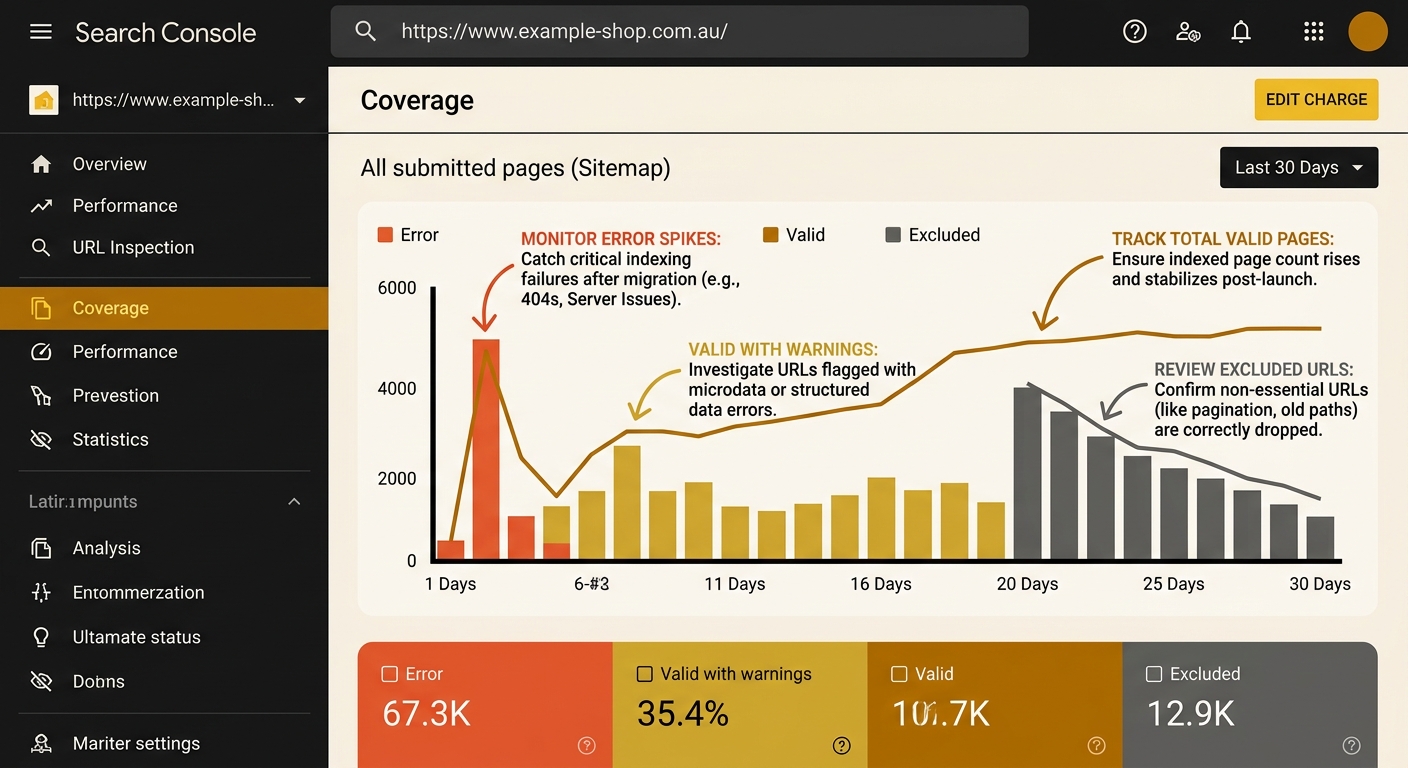
Check Google Search Console daily for the first 14 days. Watch Coverage reports for spikes in “Crawled – currently not indexed” and “Not found (404)” categories. A healthy migration shows the old domain’s indexed page count declining steadily while the new domain’s count rises at roughly the same rate. If the new domain’s indexed pages plateau below 80% of the old domain’s peak within 21 days, something in your redirect map is broken.
We’ve covered why Australian businesses lose rankings during migrations in detail, and the most common culprit is redirect coverage gaps where 10–20% of URLs simply weren’t mapped. For ecommerce sites, these unmapped URLs are typically paginated category pages, filtered product listings, and out-of-stock product pages that still carried inbound links.
Monitor organic traffic daily against your baseline. A 10–15% dip in the first week is normal. A 30%+ drop sustained beyond 14 days signals a structural problem. Compare your top 50 queries weekly. If branded queries recover but category and product queries don’t, the issue is likely redirect mapping for those specific page types.
Businesses running ecommerce SEO campaigns alongside a migration need to pause any active link-building or content publishing until the new domain stabilises. Adding new signals while Google is still processing redirect signals creates noise that slows recovery.
Where the Data Looks at 90 Days
By week 12, Google should have fully processed your migration. The new domain’s indexed page count should match or exceed the old domain’s pre-migration baseline. Organic traffic should have recovered to within 5–10% of pre-migration levels for a well-executed migration, or exceeded them if the new platform improved page speed and user experience.
Pull a fresh crawl of the new site and compare it against your original baseline export. Check for new migration crawl errors that appeared after launch: soft 404s where product pages return 200 status codes but display “page not found” content, redirect loops created by CMS updates, and canonical tag conflicts between www and non-www versions of the new domain. Run your top 50 pages through Google’s Rich Results Test again to confirm structured data survived the transition.
This is also the point to clean up technical debt from the migration itself. Update any internal links that still point to old-domain URLs through redirects. Each redirect hop adds 10–50ms of latency per page load and wastes crawl budget. For a store with 1,000 internal links still routing through 301s, that’s measurable drag on both user experience and crawl efficiency. Retire the redirect file entries for pages with zero traffic and zero backlinks after 12 months.
The 10-point website migration SEO checklist exists because each step depends on the one before it. An Australian ecommerce business that follows this sequence, documents every decision, and monitors aggressively for 90 days will preserve the search authority that took years to build. The ones that skip steps find out, usually around week three, exactly how much organic revenue they were taking for granted.