

Google renders JavaScript on pages it will never index, burning crawl budget and masking technical SEO rendering problems your standard audit tools don’t flag. Dave Smart’s controlled experiments proved that Googlebot executes fetch() calls and full script chains on noindex pages, contradicting years of documentation and the assumptions baked into most JavaScript rendering SEO audit workflows.
Smart’s Noindex Experiment
For years, the operating assumption in technical SEO was straightforward: if a page carries a noindex directive (via meta tag or HTTP header), Googlebot skips rendering entirely. The logic made sense. Why would Google spend computational resources executing JavaScript on a page it’s been told to exclude from the index? Google’s own documentation reinforced this reading, stating that Googlebot queues pages for rendering unless a robots meta tag or header tells it not to index.
Dave Smart, a UK-based technical SEO consultant, designed a controlled test to verify this assumption. He created pages with noindex directives and embedded JavaScript that made specific API calls, including fetch() requests using the POST method. The distinction between GET and POST matters here because standard link-following by a crawler produces GET requests. POST requests require active script execution inside a rendering environment.
Smart logged every request that hit his test API endpoint and waited.
The results broke the assumption open. Googlebot made POST requests to the test endpoints on noindex pages. As Smart documented: “The fact that the requests made to the test API endpoint were made with a POST method, and not a GET method, gives me more confidence that these requests are being made as part of the rendering process.” This wasn’t a partial crawl or an accidental fetch. Google’s Web Rendering Service (WRS) had fully executed the JavaScript on pages explicitly marked as excluded from the index.
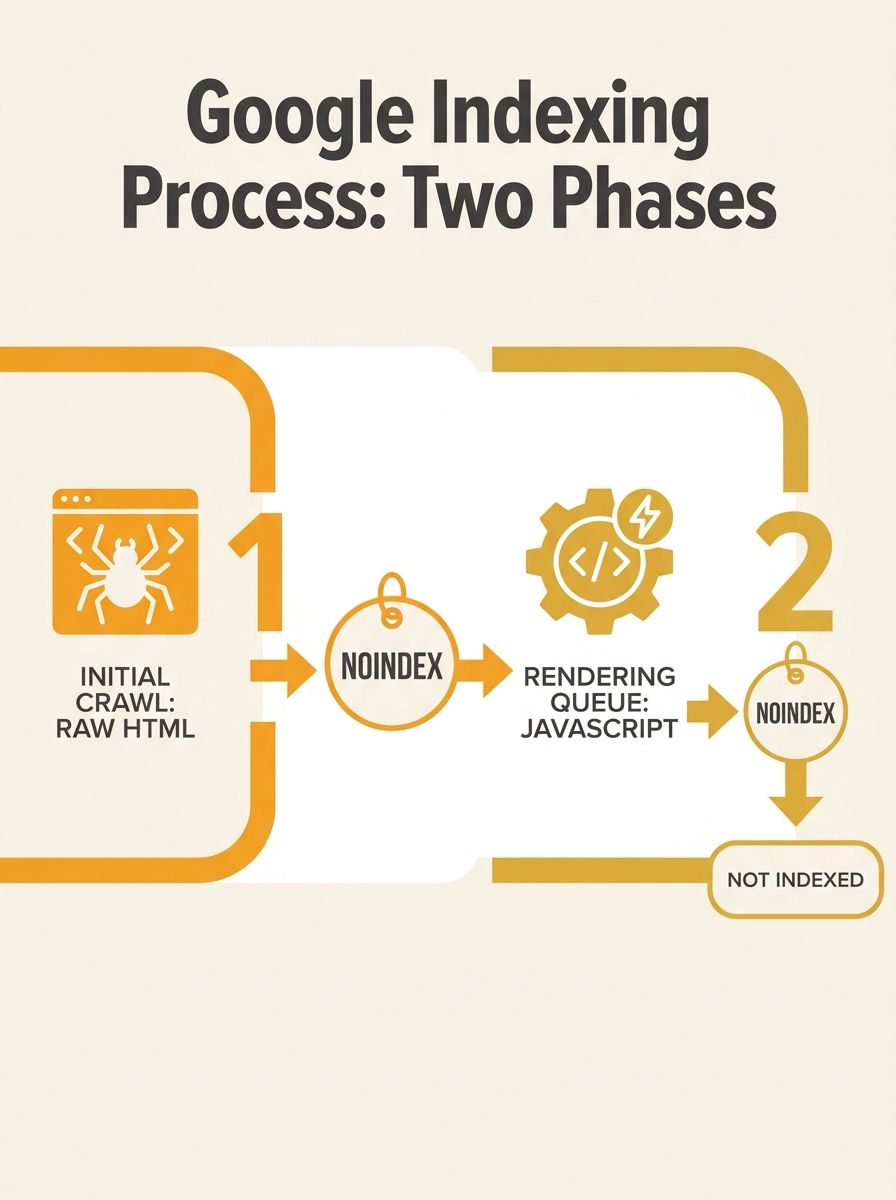
The implications ripple through every site that relies on noindex to manage crawl efficiency. If you’ve been using noindex on faceted navigation pages, filter URLs, or staging content and assumed those pages weren’t triggering rendering, Smart’s test says otherwise. Every one of those pages is potentially consuming rendering resources inside Google’s pipeline.
The Google Indexing vs Crawling Mismatch in the Rendered DOM
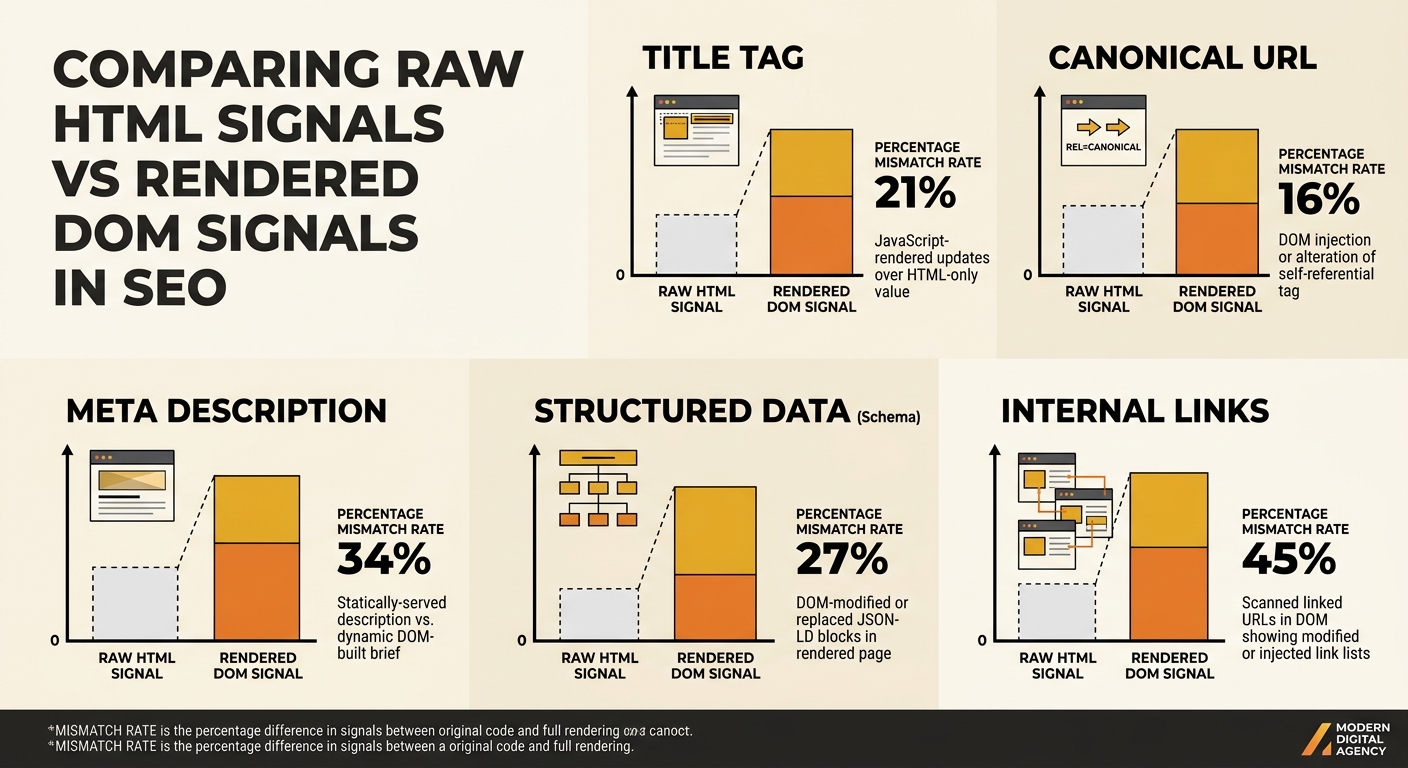
The rendering gap creates a specific, measurable problem: the HTML that Googlebot fetches on its first pass often doesn’t match the DOM it sees after JavaScript executes. And when those two versions disagree on critical SEO signals, Google’s indexing system has to pick one, often with results that confuse site owners.
According to Sitebulb’s analysis of how JavaScript rendering affects indexing, the most common mismatches appear in titles, meta descriptions, canonical URLs, and structured data. Approximately 2–3% of rendered pages show a canonical URL that differs from the one in the raw HTML. That percentage sounds small until you apply it to a 50,000-page e-commerce site: 1,000–1,500 pages where Google sees conflicting canonicals depending on which phase of its pipeline you catch.
This is the core of the Google indexing vs crawling mismatch that frustrates site owners who see “Crawled — currently not indexed” in Search Console. As ZipTie.dev documented, when rendering fails or partially completes, Google judges the page based on incomplete content. The system classifies it as low quality and files it under “Crawled currently not indexed” or “Soft 404,” even when the fully rendered page contains substantial, unique content.
There’s also a hard ceiling at play. Google processes only the first 2MB of HTML returned by a server. JavaScript-heavy single-page applications that load large bundles before meaningful content risk pushing critical elements past that boundary. The content exists, the JavaScript works, but Google’s pipeline never sees it because the payload exceeded the limit before reaching the good stuff.
Understanding how canonical tags and crawling directives interact becomes essential when your rendered and raw HTML versions disagree on canonicals. The conflict resolution rules aren’t transparent, and Google’s system doesn’t always pick the version you intended.
Fifty Thousand Filter Pages Bleeding Through Crawl Budget
Smart’s discovery has direct consequences for Australian site indexation issues, particularly on large e-commerce and classifieds sites where faceted navigation generates tens of thousands of parameter URLs.
Consider a typical Australian retail site running a JavaScript framework for its product filtering. The site owner applies noindex to all filter combination pages — colour, size, price range, brand. The expectation: Google crawls them, sees the noindex, and moves on without rendering. The reality since Smart’s findings: Google renders the JavaScript on every single one of those pages, executing API calls, loading product data, and consuming WRS resources.
A site with 50,000 noindex filter URLs isn’t saving crawl budget the way its owners think. Google is spending rendering capacity on those pages, and that capacity has limits. Vercel’s analysis of over 100,000 Googlebot fetches found that rendering was attempted on all HTML pages returning 200 status codes, with measurable time gaps between the initial crawl and completed render. For lower-authority sites, that gap can stretch from seconds to days.
Warning: If your site uses noindex on thousands of JavaScript-dependent filter pages, those pages are still being rendered. Check your server logs for rendering-related resource requests from Googlebot on URLs you assumed were being skipped.
This is where diagnosing crawl budget waste intersects with rendering audits. Traditional crawl budget analysis focuses on which URLs Googlebot requests. The rendering audit layer focuses on which URLs Googlebot renders and how much server-side resource that consumes. You need both views to understand why your indexable pages aren’t getting processed fast enough.
Martin Splitt from Google’s Search Relations team once advised SEOs to “just assume your pages get rendered and get on with it.” That advice, while technically correct about Google’s rendering ambitions, understates the gap between intent and execution. Google aims to render everything. Whether it renders everything correctly and promptly for your site depends on factors the site owner controls: payload size, resource accessibility, JavaScript error handling, and the rendering load imposed by pages that don’t need to be rendered at all.
AI Crawlers That Never Execute a Single Script
The rendering gap extends beyond Googlebot. Most LLM crawlers and AI-powered search tools don’t execute JavaScript at all. As Sitebulb’s research notes, these crawlers “consume whatever is in your raw HTML.” If your key content only appears after client-side rendering, it’s invisible to ChatGPT’s crawler, Claude’s web access, Perplexity, and every other AI agent scraping the web for training data or real-time answers.
This creates a two-front problem for Australian businesses adapting to generative search visibility. Your pages might render correctly for Googlebot (eventually, after the queue delay) but remain completely blank to AI crawlers that read only the initial HTML response. A product page built on React or Vue that delivers an empty div and a JavaScript bundle on first load gives LLM crawlers nothing to work with.
The fix has been known for years: server-side rendering (SSR) or pre-rendering. Frameworks like Next.js, Nuxt.js, and SvelteKit deliver meaningful HTML on the first response, eliminating the dependency on client-side JavaScript for content visibility. Google still documents dynamic rendering as a workaround where the server detects bots and serves pre-rendered HTML, but the documentation explicitly labels this approach as “not a recommended solution” due to added complexity and maintenance overhead.

For businesses working with Brisbane SEO teams or any Australian agency, the rendering audit question should be front and centre during site builds. Choosing a client-side-only JavaScript framework for content that needs to rank is a decision that compounds over time: every new page inherits the rendering dependency, every new AI crawler that launches inherits the blindness.
The Two-Layer Audit Smart’s Data Forces
Smart’s experiment didn’t reveal a bug. It revealed a permanent architectural reality: Google’s crawl pipeline and rendering pipeline operate on different schedules, with different resource constraints, and produce different views of your pages. Any JavaScript rendering SEO audit that checks only the indexing outcome misses the mechanical reasons behind that outcome.
The audit now requires two distinct layers running in parallel. The crawl layer examines raw HTML, status codes, robots.txt rules, and server response headers. The render layer examines the final DOM after JavaScript execution, comparing it against the raw HTML for mismatches in titles, canonicals, structured data, and content. Tools like Screaming Frog with JavaScript rendering enabled, Sitebulb’s Response vs. Render report, and Google’s URL Inspection tool each handle parts of this comparison, but no single tool covers the full picture.
SEO audits that only check whether a page is “indexed or not” are no longer enough. Audits now need to compare raw HTML vs. rendered HTML to identify signals or errors hiding behind JavaScript execution.
The practical sequence for Australian sites dealing with technical SEO rendering problems looks like this:
- Log analysis first. Pull server logs and GSC Crawl Stats to identify how much Googlebot activity targets noindex pages. Quantify the rendering waste before fixing it.
- Raw vs. rendered comparison. Run Screaming Frog or Sitebulb with JS rendering enabled across your top 500 indexable URLs. Flag any page where the canonical, title, or structured data differs between the two versions.
- Noindex page decision. For pages currently using noindex that don’t need to be accessible to Googlebot at all, consider blocking them via robots.txt instead. This prevents both crawling and rendering. But understand the trade-off: Google won’t see any directives on blocked pages, so the interaction between robots.txt and other directives needs careful planning.
- SSR or pre-rendering for content pages. Any page that needs to rank in Google or appear in AI-generated answers should deliver its core content in the initial HTML response. Client-side rendering is acceptable for interactive elements that don’t carry SEO weight.
Smart’s test didn’t change what Google does. It changed what we can prove Google does. The rendering audit gap was always there. The data to close it is now available to anyone willing to look at both layers of their site’s relationship with search engines.