

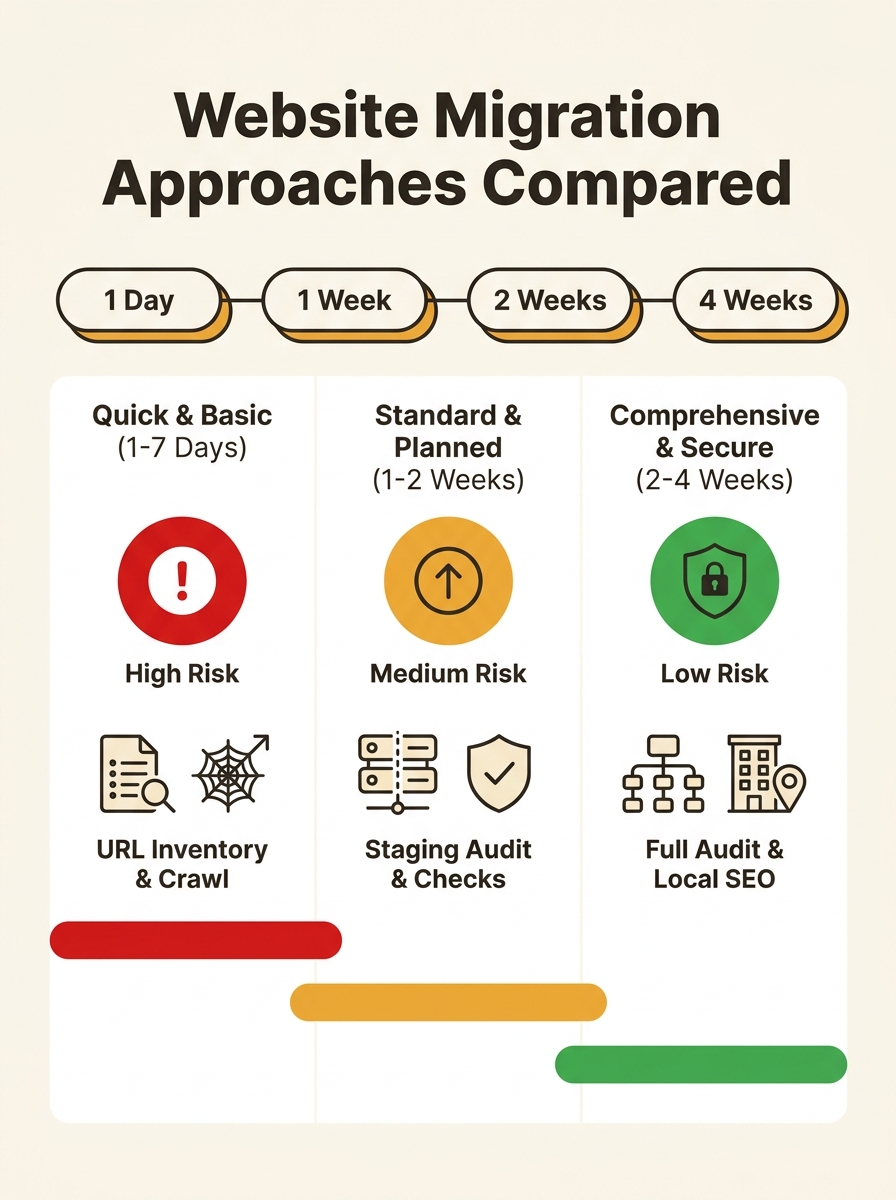
Three distinct approaches to pre-migration SEO work compete for attention when an Australian business moves its website: redirect-only, standard checklist, and full technical audit with crawl budget analysis. Each carries different time costs, different risk profiles, and dramatically different outcomes for local search rankings. The right choice depends on how much organic traffic the business can afford to lose.
TL;DR: The redirect-only migration saves time upfront but routinely destroys local rankings. The standard checklist covers surface-level bases. A full pre-migration SEO baseline with crawl budget analysis before migration takes 2-4 weeks but protects the pages driving actual revenue. For businesses dependent on local search, the third option is the only one that consistently preserves rankings through the transition.
The distinction matters because, as the FocusReactive 2026 migration guide documents, “your site rankings don’t drop at once, they erode three to four weeks later, once Google finishes reprocessing everything that changed.” By the time an Australian business owner notices the damage, the window for easy correction has closed.
| Criteria | Redirect-Only | Standard Checklist | Full Pre-Migration Audit |
|---|---|---|---|
| Time investment | 1–3 days | 1–2 weeks | 2–4 weeks |
| URL inventory | Partial or none | Automated crawl export | Full crawl + performance mapping |
| Crawl budget analysis | None | Rarely included | Log file analysis + render audit |
| Baseline metrics | None | Traffic + rankings snapshot | 12 months Search Console + conversions |
| Redirect mapping | Top-level pages only | Page-by-page | Prioritised by traffic and revenue |
| Staging environment audit | None | Basic visual check | Full technical SEO audit on staging |
| Local SEO preservation | Ignored | Partial | Schema, GBP links, NAP verified |
| Risk of rankings loss | Very high | Moderate | Low |
The Redirect-Only Migration
The redirect-only approach maps old URLs to new URLs, sets up 301 redirects, and launches. It takes one to three days, costs the least, and fails the most often for businesses that depend on local search visibility.
The appeal is obvious. A tradie in Brisbane or an accountant in Melbourne has a web developer rebuilding their site on a new platform. The developer promises to “handle the redirects.” And they do handle them, for the 10 or 15 top-level pages they know about. The problem is every other URL the site has accumulated: old blog posts, location-specific landing pages, PDF resources that have gathered backlinks over the years. Those pages vanish. Google recrawls, finds 404s, and starts devaluing the domain’s authority.
According to Google’s own crawl budget documentation, crawl budget is determined by two main elements: crawl capacity limit and crawl demand. When Googlebot hits a wave of 404 errors during a migration, crawl demand drops. The search engine devotes fewer resources to recrawling the new site. Pages that used to get indexed within days now take weeks to reappear, if they reappear at all.
The redirect-only approach also ignores location-specific schema markup, Google Business Profile URL connections, and citation consistency across Australian directories. If the business has built local SEO foundations tied to its Google Business Profile, those connections break silently during a redirect-only migration.
Warning: A redirect-only migration carries the highest risk for businesses ranking in Google’s local pack. If your Google Business Profile points to URLs that now redirect through a chain, Google treats those signals as weaker. Check your GBP website link, all category landing pages, and any URLs used in Australian business directories before launching.
Following the Standard Checklist
The standard checklist approach adds a pre-migration SEO baseline to the redirect work: benchmark current rankings, export traffic data, crawl the existing site, and map redirects page by page. Semrush’s migration checklist recommends establishing baseline analytics two to four weeks before the migration so the business understands its current state before anything changes.
This is a significant improvement over the redirect-only method. The business knows what it’s working with. It has ranking data, traffic data, and a list of every URL. Midsummer Agency’s migration guide stresses that “a precise understanding of how the site is performing before anything changes” is what allows a business to measure whether the migration succeeded.
Where the standard checklist falls short is depth. It captures surface metrics but rarely investigates why those metrics exist. A page ranking number 3 for “plumber Geelong” might owe its position to internal links from 40 blog posts, a strong backlink from a local newspaper, and structured data that Google uses for its local pack. The checklist records that the page ranks. It doesn’t record the infrastructure supporting that ranking.
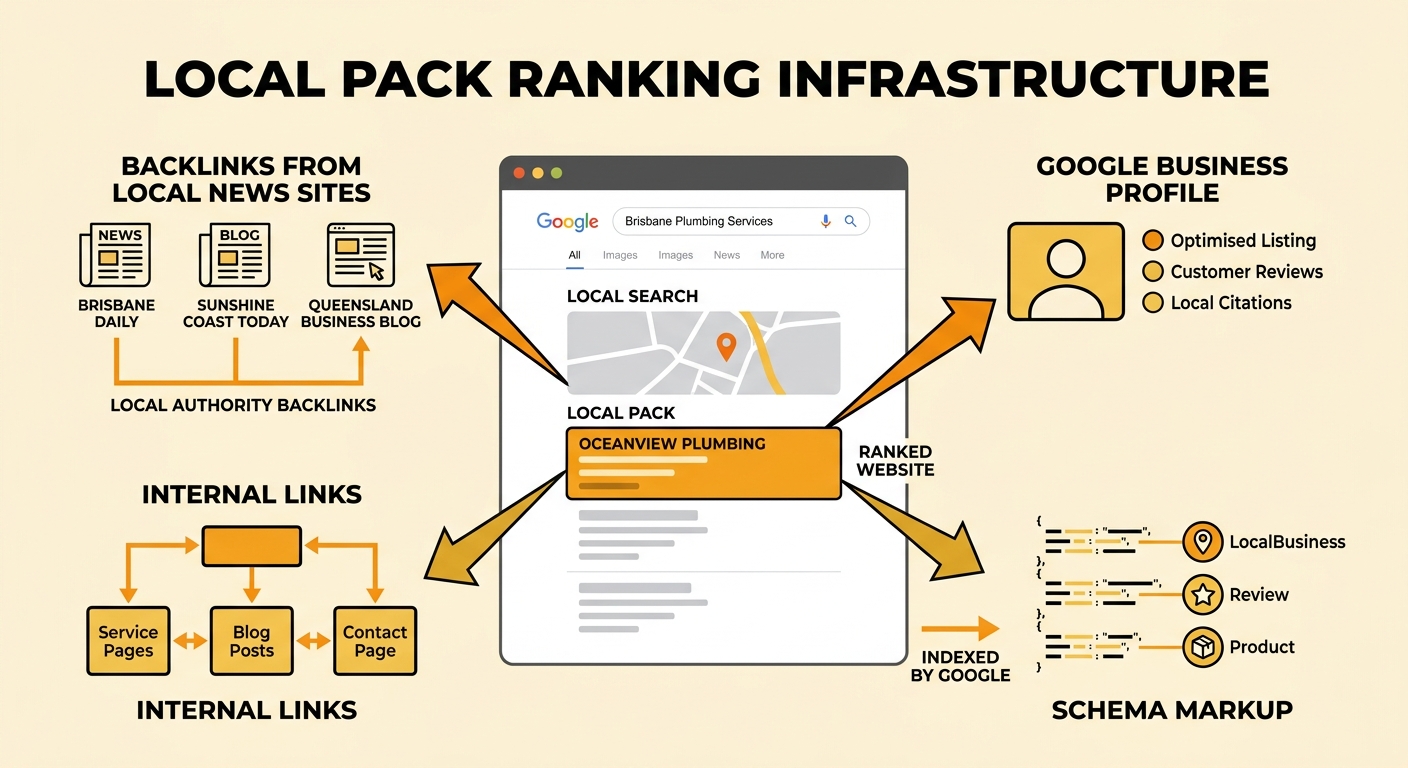
Crawl budget analysis before migration is another gap. The standard checklist exports a URL list but doesn’t examine server log files to understand how Googlebot actually crawls the site. As LinkGraph’s 2026 crawl budget guide explains, crawl budget determines how many pages Google fetches, while render budget determines how many JavaScript-heavy pages Google can actually process and understand. A page can be crawled but never rendered. If the new site is heavier on JavaScript than the old one, the standard checklist won’t flag that problem until rankings start dropping weeks after launch.
For an Australian SME doing a straightforward platform change on the same domain, with fewer than 500 pages, the standard checklist is often adequate. It covers the basics and prevents the worst outcomes. But for any Australian business domain migration involving a URL structure change, a domain change, or a move to a JavaScript-heavy platform, it leaves dangerous gaps.
The standard checklist records that a page ranks. It doesn’t record the infrastructure supporting that ranking.
What a Full Pre-Migration Technical Audit Actually Covers
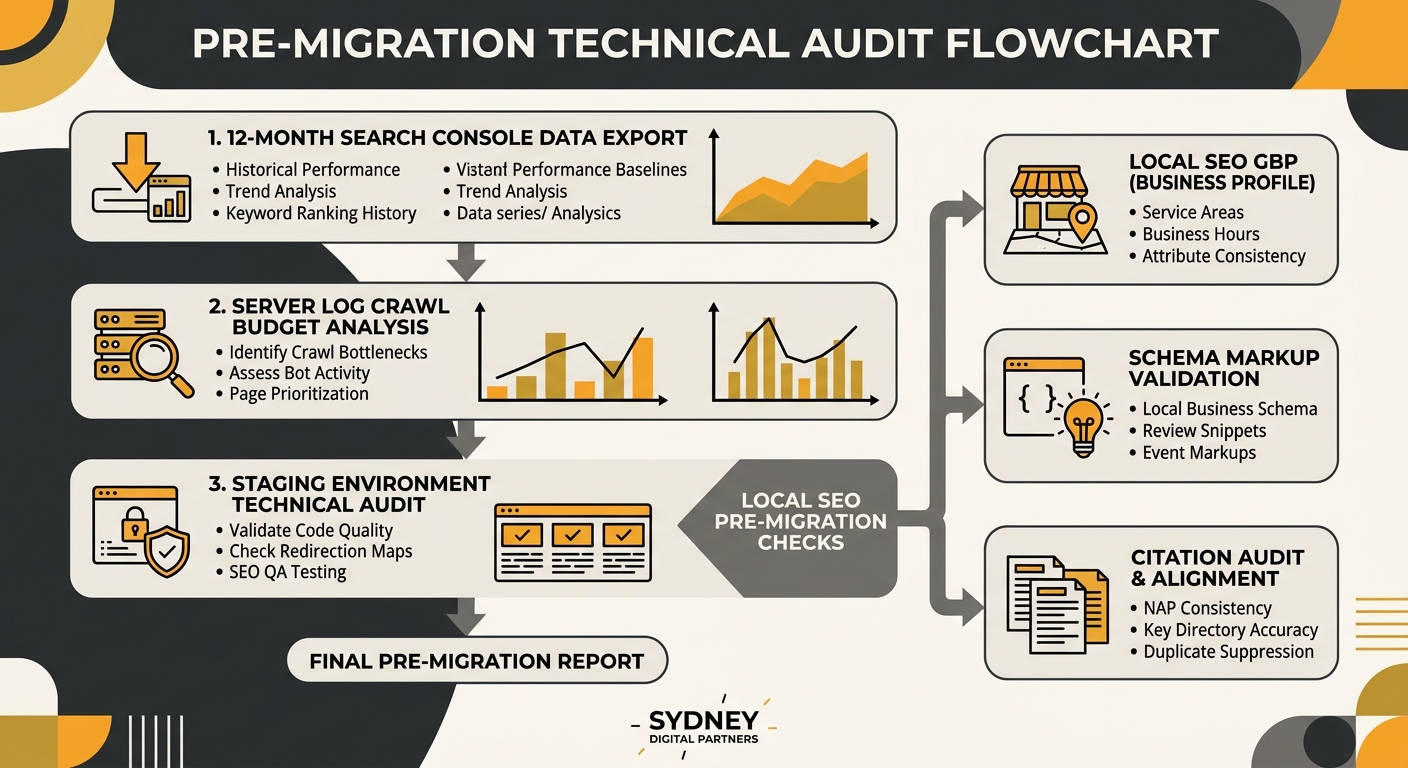
A full website migration technical audit starts two to four weeks before launch and examines every layer that affects search visibility: URL performance data, crawl behaviour, rendering, structured data, local SEO signals, and staging environment parity.
The first step is exporting 12 months of Search Console data. FocusReactive’s 2026 migration checklist is blunt: “Export 12 months of Search Console data before touching anything. You can’t measure what you don’t have a record of.” Twelve months matters because it captures seasonal patterns. A landscaper in Sydney who migrates in winter might not realise their spring-related service pages drive 40% of annual organic leads. Without a full year of data, those pages get deprioritised in the redirect mapping.
The second component is crawl budget analysis before migration. This means pulling server log files and examining how Googlebot interacts with the existing site. How frequently does it crawl? Which pages does it visit most? Which pages does it ignore? ALM Corp’s technical SEO framework for crawl budget outlines the process: log analysis, internal linking review, canonical tag audit, sitemap validation, and rendering checks. If your current site has conflicting crawling rules cancelling each other out, those conflicts will migrate to the new site unless they’re resolved first.
The third component is a full technical SEO audit on staging. O8’s 2026 migration checklist specifies checking canonical tags, meta tags, schema markup, internal links, and robots.txt on the staging environment before launch. The staging site needs to mirror production infrastructure. A staging environment running on a different CDN configuration, different server settings, or different security protocols will produce results that don’t match what happens when the site goes live.
For local businesses, the full audit adds three additional checks that the other approaches skip entirely:
- Google Business Profile URL verification: confirming every URL linked from GBP still resolves correctly after migration, including category-specific landing pages and appointment booking links.
- Local schema preservation: ensuring LocalBusiness, Service, and location-specific structured data transfers intact. If you’ve worked through schema markup priorities for Australian SMEs, losing that structured data during migration undoes the effort.
- Citation consistency: checking that the URLs listed across Australian business directories (Yellow Pages, TrueLocal, Yelp Australia) match the post-migration URL structure.
The full audit also includes priority-weighting redirects by revenue contribution. Instead of treating every redirect as equal, the audit identifies which pages generate the most organic traffic and conversions, then verifies those redirects are clean 301s with no chains, no loops, and no parameter mismatches. We’ve covered this redirect prioritisation process in our migration SEO checklist for Australian businesses.
Tip: For .com.au domain migrations specifically, export the current DNS zone including A, MX, TXT, CNAME, and subdomain records before the transfer. Crazy Domains’ Australian [domain transfer guide](https://www.crazydomains.com.au/learn/domain-transfer-australia/) recommends temporarily lowering all TTLs to 300 seconds so DNS changes propagate in minutes rather than hours. This step is free and prevents the 24-48 hour propagation gap that can cause intermittent 404s during migration.
How To Choose Between These Three
The right approach depends on three factors: how many pages the site has, whether the domain or URL structure is changing, and how much of the business’s revenue comes from local organic search.
A small brochure site under 50 pages, staying on the same domain, doing a visual redesign only, can get away with a strong standard checklist. The redirect mapping is simple. The crawl budget implications are minimal. The risk is low enough that the time investment of a full audit isn’t justified.
An Australian business changing domains, moving from HTTP to HTTPS (yes, some still haven’t), restructuring URLs, or switching to a JavaScript-heavy framework needs the full pre-migration technical audit. The same applies to any business where local pack rankings are a primary revenue driver. Losing position 1 for “dentist Parramatta” for eight weeks while Google reprocesses the migration has a direct, measurable cost in missed appointments.
And any business that has accumulated technical SEO debt through years of pagination issues, conflicting canonical tags, or orphaned pages should treat migration as an opportunity to resolve those problems, but only if the audit identifies them first. Migrating technical debt to a new platform without cleaning it up means the new site inherits every problem the old one had, plus the additional stress of Google reprocessing hundreds of changed URLs.
The uncomfortable truth is that the full pre-migration audit costs two to four weeks of preparation time before a single page goes live. For an Australian SME eager to launch a redesigned site, that delay feels painful. But the alternative, watching three to four weeks of rankings erosion after launch with no baseline data to diagnose the cause, is worse in every measurable way.